Handwriting and Stamps
Handwriting over a printed value—keep the print, the ink, or both?
✅ NormativeSettled. The requirement holds as written.📄 Page ruleCan be applied from the page alone.Read §9.6.5 in the RFC ↗
Handwriting over a printed value MUST keep both, the struck-through printed value first:
~~60~~ 55 — the same markup as a printed redline replacement. A stamp over a table MUST keep
its text and MUST be rendered outside the table, as page-level content; it MUST NOT be
assigned to a cell.
When it applies
Filled-in ledgers and approved/void stamps put ink on top of a grid that was printed empty.
| Qty | Description | Amount |
| 2   | Widget      | ~60~ 55 (handwritten) |  ← replaces? joins? annotates?

     [ APPROVED ]   ← stamp overlapping three cells: which cell gets it? any?
Reading the examples. Each one pairs a source page with the output the rule expects. ✅ Sample: the rule applies. ❌ Counter-sample: it looks like it applies and does not, or a rendering got it wrong. A non-conforming output, in red, is shown only for contrast. … marks content left out of an excerpt.
The point, in a small example
Preserve the old and replacement values together, while keeping a page-level stamp outside the table. These pages are made up to isolate the rule.
A correction and a stamp play different roles
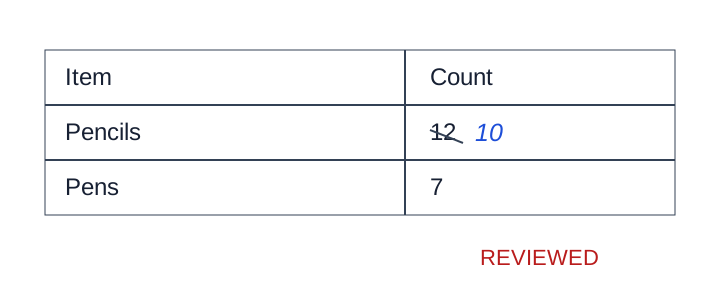
The blue slanted “10” represents a handwritten correction to the struck 12. Retain both. The REVIEWED stamp is below the grid and stays outside the table. This is a schematic teaching illustration of handwriting.
Source page
Expected output
<table>
<tr><th>Item</th><th>Count</th></tr>
<tr><td>Pencils</td><td>~~12~~ 10</td></tr>
<tr><td>Pens</td><td>7</td></tr>
</table>

REVIEWED
Handwriting over a printed value
The cell MUST hold the printed value struck through, then the handwritten one:
page shows:   60 (printed, crossed out)   55 (handwritten)
rendered as:  ~~60~~ 55
This is deliberately the same markup as Struck and Replaced Values (§9.6.7). A printed correction and a handwritten one are the same act — a value replaced in place — and the ink used to make the change is not what a consumer needs to know. One encoding covers both, so nothing downstream has to distinguish a pen from a strikethrough font to read the cell.
The printed and the handwritten digits MUST NOT be merged into one number. OCR readily runs them together and produces a number that appears nowhere on the page and looks entirely reasonable; the image decides which glyphs are printed and which are written, and they are recorded as two values.
Handwriting that adds a value where the printed cell was empty is simply the cell's content.
Stamps
A stamp belongs to the page, not to a cell. It overlaps cells only because of where it landed, so any cell it could be assigned to is arbitrary — and putting its text inside a cell corrupts a value that is otherwise correct.
- The stamp MUST be kept and rendered outside the table, as its
[stamp: …]marker — see Stamps (§7.3.11). - Its letters MUST NOT be distributed across the cells it crosses, and it MUST NOT be dropped for having nowhere obvious to go.
Assigning a stamp to a cell fails in both directions: it corrupts the cell's value, and it makes the stamp's own text unreadable by splitting it. Every candidate cell is equally arbitrary, which is the tell that the cell level is the wrong level.
No example page exercises either case yet; the sketches above stand in for one.
Neighbouring rules, and how they differ
More
Rule id tables-handwriting-and-stamps · tables marks redline