Nested Tables
A table inside a cell—nest it, flatten it, or subdivide?
✅ NormativeSettled. The requirement holds as written.📄 Page ruleCan be applied from the page alone.Read §9.5.2 in the RFC ↗
A small grid printed inside one cell of a table MUST be rendered by subdividing that cell into the
outer table's own grid: the inner grid's cells become rows and columns of the outer table, and the
neighbouring cells span them. The output MUST NOT contain a nested <table> element, and MUST NOT
flatten the inner grid into text.
When it applies
A cell that itself contains a small grid: a fee schedule inside a plan-comparison cell, a mini-table of components inside one row of a summary.
| Plan | Fees                          |
| A    | ┌ admin │ 0.25% ┐            |
|      | └ fund  │ 0.10% ┘   ← a table inside the cell
Reading the examples. Each one pairs a source page with the output the rule expects. ✅ Sample: the rule applies. ❌ Counter-sample: it looks like it applies and does not, or a rendering got it wrong. A non-conforming output, in red, is shown only for contrast. … marks content left out of an excerpt.
Recognising a nested table
The inner grid has its own alignment: two or more columns of its own, sometimes its own header row, and its own row boundaries that do not line up with the outer table's rows. That is what separates it from a cell that merely holds several lines of text, which is governed by Record Groups and Multi-Line Cells (§9.5.3).
Rendering
The inner grid's cells MUST become real cells of the outer table, and every cell alongside it MUST span the rows it now occupies:
<tr>
  <td rowspan="2">A</td>
  <td>admin</td><td>0.25%</td>
</tr>
<tr>
  <td>fund</td><td>0.10%</td>
</tr>
A is printed once and genuinely covers both fee rows, so rowspan="2" is a true statement about
the page — the same test Repeated Identical Values (§9.5.4) applies everywhere else.
- No nested
<table>. A nested table makes the inner grid invisible to anything that walks the outer one: cell counts, column arithmetic and per-cell boxes all stop at the<td>boundary. Subdividing keeps every value addressable at the same level as the rest of the table, and the outer grid still reconciles — see the leaf-track check in Multi-Row Header Tiers (§9.3.3). - Pairs MUST survive. The pairing inside the inner grid is the data:
admingoes with0.25%andfundwith0.10%. An encoding that lists all the labels and then all the values has destroyed the table; so has flattening the cell to<br/>-separated text.
This is one of several cases that need HTML tables rather than pipe tables, which cannot express the spans this rule depends on (see Markdown Rendering (§3.2)). The others are spans in Multi-Row Header Tiers (§9.3.3), full-width band rows in Bands Inside the Grid (§9.2.1), and level markers on the stub in Row-Label Hierarchy (§9.5.5).
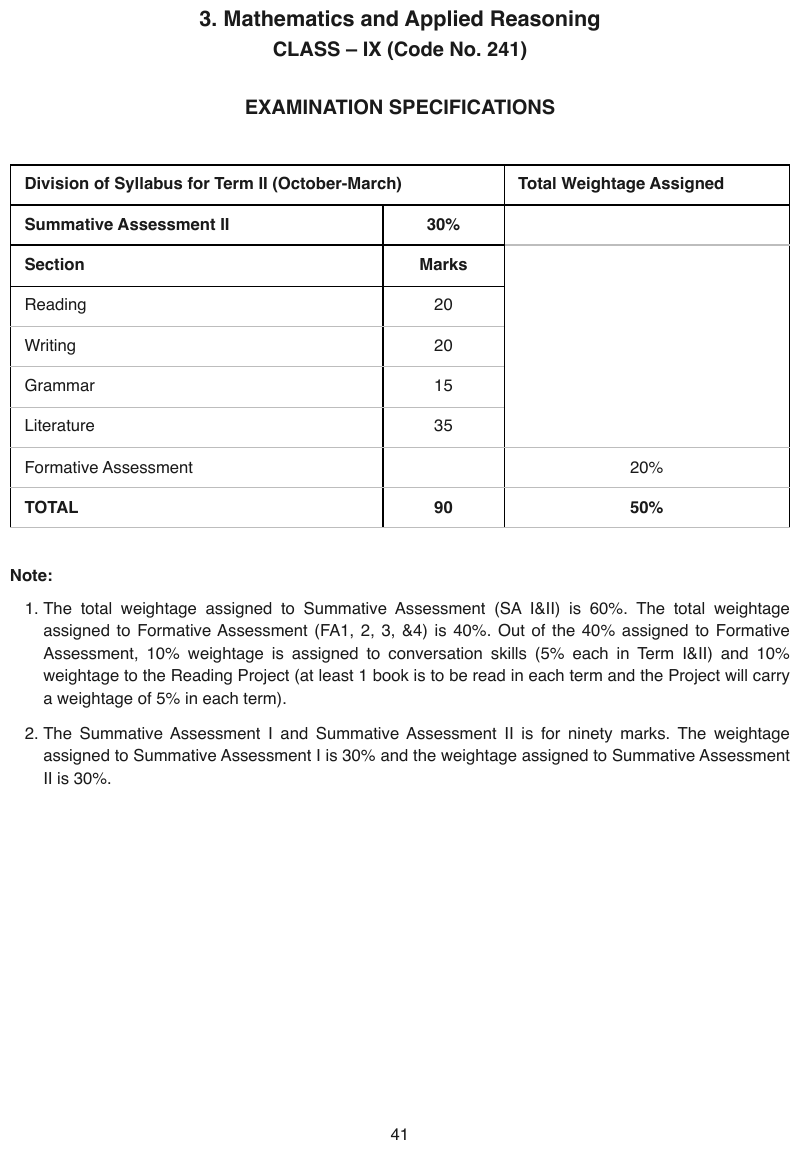
The left two columns form an embedded Section / Marks mini-tableen
The left two columns form an embedded Section / Marks mini-table, with its own Summative Assessment II / 30% heading row, while a single ruled cell on the right spans all five of its rows and prints nothing. The TOTAL row is bold.
Source page
Expected output
| Division of Syllabus for Term II (October-March) | Total Weightage Assigned | |
|---|---|---|
| Summative Assessment II | 30% | |
| Section | Marks | |
| Reading | 20 | |
| Writing | 20 | |
| Grammar | 15 | |
| Literature | 35 | |
| Formative Assessment | 20% | |
| TOTAL | 90 | 50% |
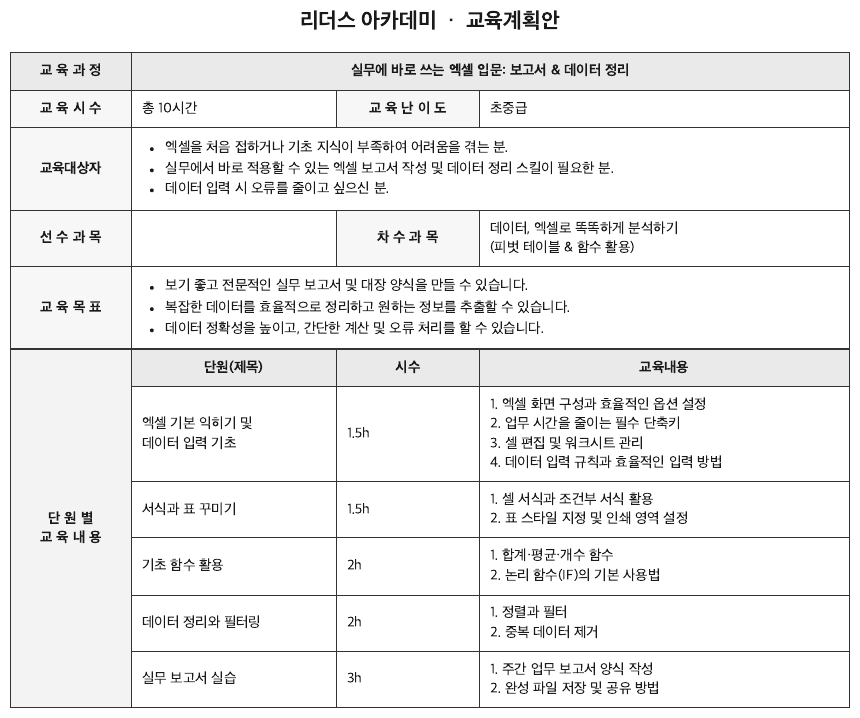
A rowspan-6 단 원 별 교 육 내 용 stub encloses its own mini-gridkorean-curriculum
A rowspan-6 단 원 별 교 육 내 용 stub encloses its own mini-grid — complete with a shaded header
row 단원(제목) / 시수 / 교육내용 — inside the outer table. The shaded label cells on the left are
bold; the two bulleted cells print • bullets.
Source page
Expected output
| 교 육 과 정 | 실무에 바로 쓰는 엑셀 입문: 보고서 & 데이터 정리 | ||
|---|---|---|---|
| 교 육 시 수 | 총 10시간 | 교 육 난 이 도 | 초중급 |
| 교육대상자 |
| ||
| 선 수 과 목 | 차 수 과 목 | 데이터, 엑셀로 똑똑하게 분석하기 (피벗 테이블 & 함수 활용) | |
| 교 육 목 표 |
| ||
| 단 원 별 교 육 내 용 | 단원(제목) | 시수 | 교육내용 |
| 엑셀 기본 익히기 및 데이터 입력 기초 | 1.5h | 1. 엑셀 화면 구성과 효율적인 옵션 설정 2. 업무 시간을 줄이는 필수 단축키 3. 셀 편집 및 워크시트 관리 4. 데이터 입력 규칙과 효율적인 입력 방법 | |
| 서식과 표 꾸미기 | 1.5h | 1. 셀 서식과 조건부 서식 활용 2. 표 스타일 지정 및 인쇄 영역 설정 | |
| 기초 함수 활용 | 2h | 1. 합계·평균·개수 함수 2. 논리 함수(IF)의 기본 사용법 | |
| 데이터 정리와 필터링 | 2h | 1. 정렬과 필터 2. 중복 데이터 제거 | |
| 실무 보고서 실습 | 3h | 1. 주간 업무 보고서 양식 작성 2. 완성 파일 저장 및 공유 방법 | |
Neighbouring rules, and how they differ
More
Rule id tables-nested-tables · tables encoding rare