The Page Is the Ground Truth
The text layer and the rendered page disagree—which one counts?
✅ NormativeSettled. The requirement holds as written.📄 Page ruleCan be applied from the page alone.Read §2.1 in the RFC ↗
The output MUST represent the document as rendered: what a careful reader extracts from the pages, semantic structure over visual appearance, with text transcribed verbatim — typos included.
When it applies
The PDF text layer, OCR and any other output are supporting evidence, never authority. Where they disagree with the rendered page, the page governs.
- Text MUST be transcribed exactly as printed. Spelling, punctuation, capitalisation and numbers MUST NOT be corrected, normalised or completed.
- Content that is not visible on the rendered page — hidden text-layer strings, text clipped by the page edge, white-on-white text — MUST NOT appear in the output. See Clipped Text (§7.3.1).
- Structure MUST be read from what the page prints and how it is laid out, not from what the content "should" be: a table is a table because the page lays it out as one.
- A disputed character SHOULD be settled from a zoomed view of the page or the word geometry, never from what looks plausible.
Reading the examples. Each one pairs a source page with the output the rule expects. ✅ Sample: the rule applies. ❌ Counter-sample: it looks like it applies and does not, or a rendering got it wrong. A non-conforming output, in red, is shown only for contrast. … marks content left out of an excerpt.
The point, in a small example
Compare visible content with hidden-but-extractable strings, then preserve an actual printed typo and avoid inventing absent table rows. Visibility is determined from the rendering, not from the presence of text objects. These pages are made up to isolate the rule.
Extractable strings are not necessarily visible content
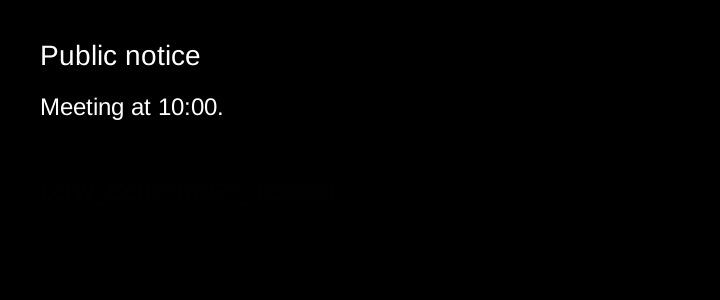
At the normal rendered size, only the white heading and meeting line are readable. The original SVG deliberately contains zero-opacity text, #010101 text on #000000 and 0.01-pixel text. Do not recover those strings by inspecting source/XML and pretend they were visible. Very small text that is genuinely readable remains content; this is not a blanket size threshold.
Source page
Non-conforming output
What the rule rules out.
Public notice

Meeting at 10:00.

INVISIBLE_TOKEN
LOW_CONTRAST_TOKEN
TINY_TOKEN
Expected output
Public notice

Meeting at 10:00.Text inside an image is still text
Transcribe all visible text, including the printed typo “Wednsday”. Do not substitute an image link, a summary or a corrected spelling. The top line is a notice label, not a document section.
Source page

Non-conforming output
What the rule rules out.
Expected output
Delivery notice

Arrives Wednsday at 09:30.

Gate B — keep this slip.Headers without a body are ordinary text
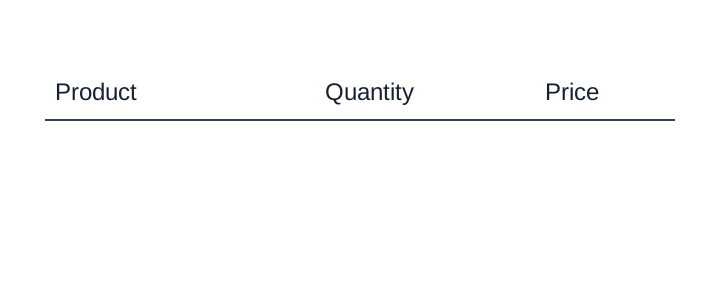
This is the complete available crop. No data rows or adjoining page are available. Preserve the labels without creating an empty table or inventing rows.
Source page
Non-conforming output
What the rule rules out.
<table><tr><th>Product</th><th>Quantity</th><th>Price</th></tr></table>Expected output
Product
Quantity
PriceWhich text counts as page content
Text is in scope only when it has a visually perceptible presence in the rendered page. A string existing in the source file, being selectable, or being returned by OCR does not make it visible content. Visibility is judged on the supplied rendition with its original colours, opacity, clipping and overlays intact. Ordinary zoom or a higher-resolution rendering MAY be used to inspect real fine print; changing contrast, recolouring text, removing an overlay, or magnifying a microscopic source object until it becomes readable MUST NOT bring hidden content into scope.
| Situation | Required treatment |
|---|---|
| Hidden OCR/text layer, transparent text, invisible rendering mode, text behind an opaque object, or text wholly outside the crop | Omit the hidden string. It MUST NOT be transcribed or given an output element or box. |
White text on white, black on black, or effectively imperceptible contrast such as #010101 on #000000 |
Omit text whose presence cannot be perceived with the original appearance. Contrast enhancement or the source colour values MUST NOT be used to recover it into the output. |
Microscopic text such as 0.01 pt at its final rendered scale |
Omit it when it has no perceptible textual presence. Arbitrarily large zoom or a source-text dump does not make it page content. |
| Small but visible fine print, a faint watermark, or low-contrast text still perceptible as text | Keep it. Inspect at ordinary zoom or higher rendering resolution; size or low contrast alone is not an exclusion. |
| A visible text region whose characters remain unreadable | Preserve legible fragments and use [illegible] for the unreadable span. Do not guess from OCR or context, and do not treat a visibly present region as invisible. |
| Partly clipped, covered or redacted text | Keep only visible characters and apply Clipped Text (§7.3.1), Overlapping Text (§7.3.6) or Redacted Text (§7.3.8); never recover concealed characters from the source layer. |
A font-size or colour threshold alone MUST NOT decide visibility: source transforms can enlarge a
small font, and contrast depends on the actual rendered background. 0.01 pt refers to final
appearance, not an untransformed font-size field. The distinction is no perceptible text
(omit) versus perceptible text with unreadable characters (retain the evidence without guessing).
The hidden string MUST NOT leak into labels, descriptions, alternate text or sidecar metadata.
An optional review note MAY describe the exclusion without copying the hidden content.
These exclusions define the scope of Never Drop, Never Invent (§2.2). They do not permit dropping readable footnotes, margin text, rotated text, dense tables or deliberately faint but visible marks. For damaged regions or unusable pages, apply Ignoring and Rejecting (§5.6).
Neighbouring rules, and how they differ
More
Rule id principles-the-page-is-the-ground-truth · principles