Elements
What is the unit of output, and how is each kind written?
✅ NormativeSettled. The requirement holds as written.📄 Page ruleCan be applied from the page alone.Read §3.1 in the RFC ↗
A document is represented as a sequence of pages, each a sequence of elements in reading order. Every element MUST have exactly one class from the table below and MUST be rendered in Markdown as that class prescribes.
When it applies
An element is the smallest unit the protocol reasons about: it has one class, one rendering, one position in reading order and — when boxes are requested — one box. The classes are the layout classes of Block Classes (§5.3); the rendering column says how each appears in the Markdown. An element's class MUST be identical in its layout annotation and its Markdown representation. Its Markdown syntax MAY be shared by several classes; the element's role determines the class.
| Class | Rendering in Markdown | Defined in |
|---|---|---|
| Title | ATX heading at the document's top level | Document Type (§4.4), Heading Depth Across Pages (§4.5) |
| Section-header | ATX heading (#…######) at its document depth |
Heading Depth Across Pages (§4.5), Recognising Ambiguous Headings (§6.7) |
| Text | Paragraph; inline marks per Text Formatting Conventions (§7.1) | chapter 7 |
| List-item | Markdown list item, nesting by printed indentation | Bullets and Sub-Bullets (§8.1) |
| Table | HTML <table> |
chapter 9 |
| Caption | For a table or chart, <caption> first or last inside its table HTML according to reading order; otherwise a paragraph adjacent to its object |
Titles Banners Captions (§9.7.3) |
| Footnote | Paragraph at its printed position | Footnotes Inside the Frame (§9.7.2) |
| Formula | $$ … $$ LaTeX, with its printed equation number |
Displayed Equations (§7.2.2) |
| Picture | Its content as text: a chart table (<table data-source="chart">), a diagram/<language> block, a description fallback block, or a prose description |
Images and Figures (§12.1.2) |
| Code | Fenced code block | Block Classes (§5.3) |
| Page-header / Page-footer | Its own block, never a heading | Recurring Page Furniture (§4.6), Markdown Rendering (§3.2) |
| Form / Key-Value Region | Key-value lines with [blank] for empty fields |
chapter 10 |
| Checkbox-Selected / -Unselected | [x] / [ ] before its label |
Checkboxes (§10.4.2) |
| Document Index | Nested list, label then page number | Table of Contents (§6.10) |
Reading the examples. Each one pairs a source page with the output the rule expects. ✅ Sample: the rule applies. ❌ Counter-sample: it looks like it applies and does not, or a rendering got it wrong. A non-conforming output, in red, is shown only for contrast. … marks content left out of an excerpt.
The point, in a small example
Similar rectangular regions can be tables, forms or pictures. Choose the class from the content and role before choosing the output syntax; these samples omit optional boxes. These pages are made up to isolate the rule.
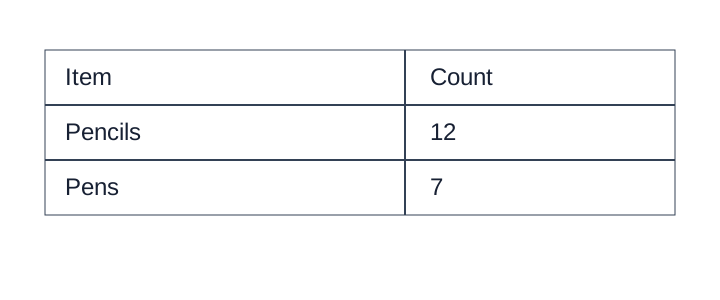
A pictured table stays a table
The image contains a two-column table. Preserve both rows and the printed headers; a prose summary loses the cell relationships.
Source page
Non-conforming output
What the rule rules out.
A table listing stationery supplies.Expected output
<table>
<tr><th>Item</th><th>Count</th></tr>
<tr><td>Pencils</td><td>12</td></tr>
<tr><td>Pens</td><td>7</td></tr>
</table>Keep values verbatim and blank fields explicit
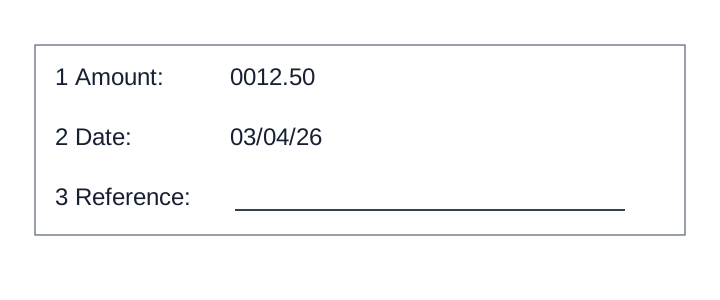
These are labeled fill-in fields, not a table. Keep leading zeros and the ambiguous date exactly as printed; do not infer a currency or expand the date. The third answer line is empty.
Source page
Non-conforming output
What the rule rules out.
- **Amount:** $12.50
- **Date:** March 4, 2026
Expected output
- \[1\] **Amount:** 0012.50
- \[2\] **Date:** 03/04/26
- \[3\] **Reference:** [blank]A flow image becomes a diagram
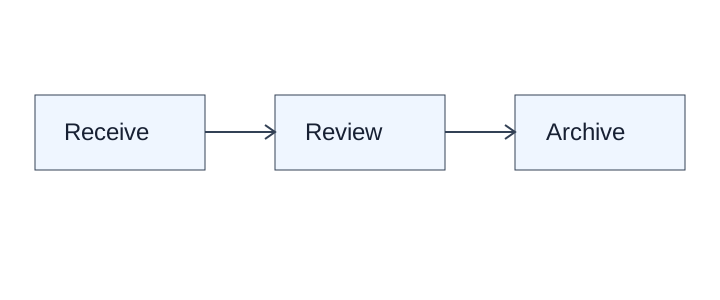
Keep all three printed labels and both directed connections. This simple flow fits Mermaid; other faithful supported diagram languages are valid.
Source page
Non-conforming output
What the rule rules out.
[A three-step process diagram]Expected output
```diagram/mermaid
flowchart LR
  A[Receive] --> B[Review]
  B --> C[Archive]
```
Elements inside elements
A table contains cells; a list contains items; a form contains fields. These inner elements are rendered inside their parent's Markdown and receive boxes only at the granularity that was requested — see Boxes and Granularity (§3.3).
A table or chart caption is rendered inside its object's <table> but retains the Caption class
and its own layout box. HTML nesting does not merge the caption into the Table or Picture class.
Content outside the reading flow
Watermarks, margin banners, stamps, seals, handwriting and sidenotes are elements too. Each has a defined place in the Markdown even though it sits outside the body flow on the page — see Watermarks (§7.3.13), Margin Banners (§7.3.5), Seals and Round Stamps (§7.3.9), Handwritten Annotations (§7.3.3) and Marginal Notes (§6.4).
Neighbouring rules, and how they differ
More
Rule id output-elements · output output-model layout