Block Boundaries
Does a table block include its caption?
✅ NormativeSettled. The requirement holds as written.📄 Page ruleCan be applied from the page alone.Read §5.2 in the RFC ↗
A Picture or Table element MUST contain the complete object and nothing else. Its caption, its title, its source note and nearby prose MUST NOT be absorbed into it; each is an element of its own.
When it applies
In the diagrams below the overlays show boxes by class colour; a red ✗ or green ✓ marks an incorrect or a correct boundary and is not a class colour.
Reading the examples. Each one pairs a source page with the output the rule expects. ✅ Sample: the rule applies. ❌ Counter-sample: it looks like it applies and does not, or a rendering got it wrong. A non-conforming output, in red, is shown only for contrast. … marks content left out of an excerpt.
Picture boundaries
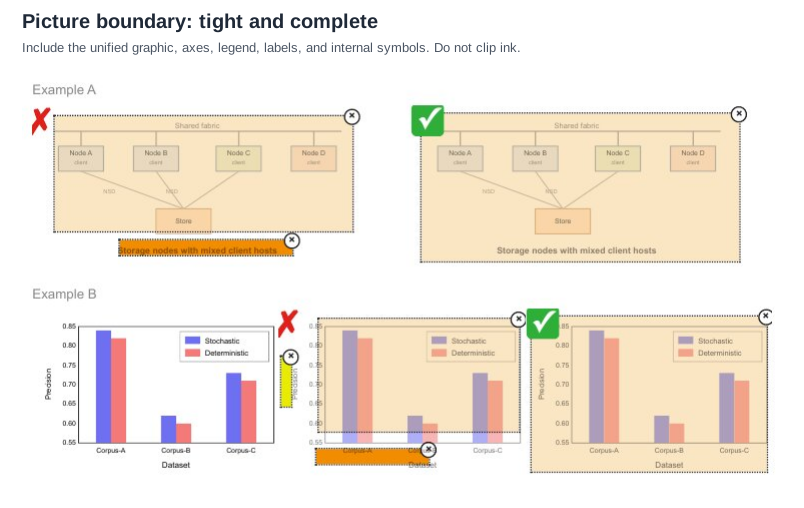
A Picture MUST include the full unified graphic — plots, axes, tick labels, legends, arrows, symbols, and any text drawn inside the graphic. Clipping the axis labels or the legend off a chart is the common error, and it removes exactly the parts that make the chart readable. A caption printed outside the graphic stays a separate Caption element.
Pale beige = Picture · orange = Caption · yellow = Textblock-picture-boundary
Storage nodes with mixed client hosts is drawn inside the graphic, so the correct box
(✓) is one Picture that includes it; the ✗ box splits it off as a Caption. Example B is a bar chart:
the correct box (✓) is one Picture that includes the rotated Precision axis title, the tick
labels and the Dataset axis title; the ✗ box clips the plot area and files the two axis titles
as Text and Caption. Expected boxes: one Picture per example, nothing else.Source page
Expected output · Example A
flowchart TD
  F[Shared fabric] --- A[Node A<br/>client]
  F --- B[Node B<br/>client]
  F --- C[Node C<br/>client]
  F --- D[Node D<br/>client]
  A ---|NSD| S[Store]
  B ---|NSD| S
  C --- S
Storage nodes with mixed client hosts
```diagram/mermaid
flowchart TD
  F[Shared fabric] --- A[Node A<br/>client]
  F --- B[Node B<br/>client]
  F --- C[Node C<br/>client]
  F --- D[Node D<br/>client]
  A ---|NSD| S[Store]
  B ---|NSD| S
  C --- S
```

Storage nodes with mixed client hosts
Expected output · Example B
Precision
| Dataset | Stochastic | Deterministic |
|---|---|---|
| Corpus-A | 0.84 | 0.82 |
| Corpus-B | 0.62 | 0.60 |
| Corpus-C | 0.73 | 0.71 |
Precision

<table data-source="chart">
<tr> <th>Dataset</th> <th>Stochastic</th> <th>Deterministic</th> </tr>
<tr> <td>Corpus-A</td> <td>0.84</td> <td>0.82</td> </tr>
<tr> <td>Corpus-B</td> <td>0.62</td> <td>0.60</td> </tr>
<tr> <td>Corpus-C</td> <td>0.73</td> <td>0.71</td> </tr>
</table>
The bars print no values; the values above are read against the printed 0.55–0.85 axis.
One caption or several
- One caption shared across several panels → one Picture element.
- Separate captions → separate Picture elements.
The caption says what the author considered one figure. Multi-panel figures labelled a), b),
c) under a single caption MUST be one Picture; the same panels each with their own caption MUST
be several.
Pale beige = Picture · orange = Caption · red = Section-header · yellow = Textblock-picture-grouping
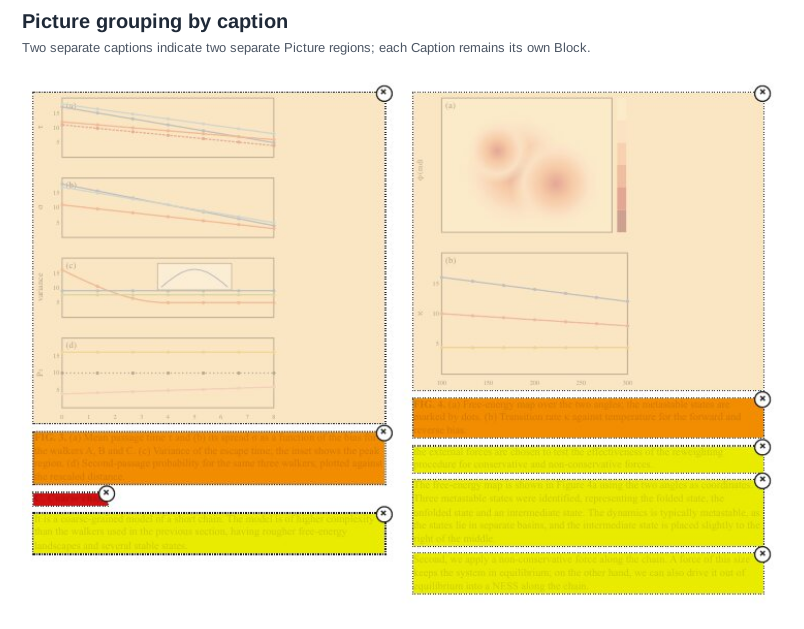
FIG. 3. form one Picture; two panels (a)–(b) above
FIG. 4. form a second. Each caption is its own element. Expected boxes, left column then right:
Picture, Caption, Section-header, Text; Picture, Caption, Text, Text, Text. The overlay tints the
text; it is transcribed from the page source. The chart content of the two Pictures prints no
values and is elided.Source page
Expected output
…
| … |
C. Coarse chain
It is a coarse-grained model of a short chain. The model is of higher complexity than the walkers used in the previous section, having rougher free-energy landscapes and several stable states.
…
| … |
the external forces are chosen to test the effectiveness of the reweighting procedure for conservative and non-conservative forces.
The free-energy map is shown in Figure 4a using the two angles as coordinates. Three metastable states were identified, representing the folded state, the unfolded state and an intermediate state. The dynamics is typically metastable, as the states lie in separate basins, and the intermediate state is placed slightly to the right of the middle.
Second, we apply a non-conservative force along the chain. A force of this size keeps the system in equilibrium; on the other hand, we can also drive it out of equilibrium into a NESS along the chain.
Table boundaries: the caption has its own box
The Table element MUST include the complete grid, its headers, aligned totals and all column content. It MUST exclude the table's title, its caption, its source note, and any prose beside it.
These are layout boundaries. A table or chart caption is rendered as <caption> inside its
object's HTML table, first or last according to reading order, while retaining its own Caption
class and box. See Titles Banners Captions (§9.7.3).
Pink = Table · orange = Caption · yellow = Textblock-table-caption-excluded
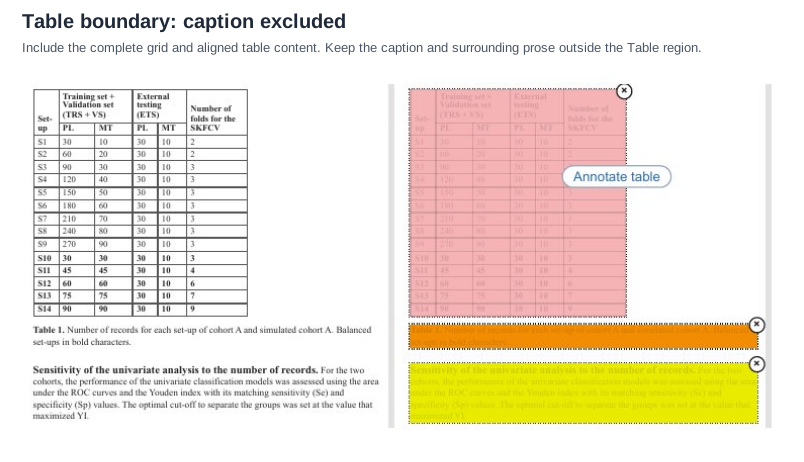
Table 1. below
it and a paragraph with a bold run-in heading. Expected boxes: one Table around the grid only, one
Caption, one Text. Rows S10–S14 are printed bold.Source page
Expected output
| Set-up | Training set + Validation set (TRS + VS) | External testing (ETS) | Number of folds for the SKFCV | ||
|---|---|---|---|---|---|
| PL | MT | PL | MT | ||
| S1 | 30 | 10 | 30 | 10 | 2 |
| S2 | 60 | 20 | 30 | 10 | 2 |
| S3 | 90 | 30 | 30 | 10 | 3 |
| S4 | 120 | 40 | 30 | 10 | 3 |
| S5 | 150 | 50 | 30 | 10 | 3 |
| S6 | 180 | 60 | 30 | 10 | 3 |
| S7 | 210 | 70 | 30 | 10 | 3 |
| S8 | 240 | 80 | 30 | 10 | 3 |
| S9 | 270 | 90 | 30 | 10 | 3 |
| S10 | 30 | 30 | 30 | 10 | 3 |
| S11 | 45 | 45 | 30 | 10 | 4 |
| S12 | 60 | 60 | 30 | 10 | 6 |
| S13 | 75 | 75 | 30 | 10 | 7 |
| S14 | 90 | 90 | 30 | 10 | 9 |
Sensitivity of the univariate analysis to the number of records. For the two cohorts, the performance of the univariate classification models was assessed using the area under the ROC curves and the Youden index with its matching sensitivity (Se) and specificity (Sp) values. The optimal cut-off to separate the groups was set at the value that maximized YI.
Table boundaries: the structure, not the ink
The Table element MUST follow the actual row-column structure, not every visible rule around it. Decorative borders, section rules and frame lines drawn around a table are not part of it. There MUST be exactly one Table element around the full table, and no region-level element for its rows, columns, cells or internal text.
Pink = Table · red = Section-header · yellow = Textblock-table-structure
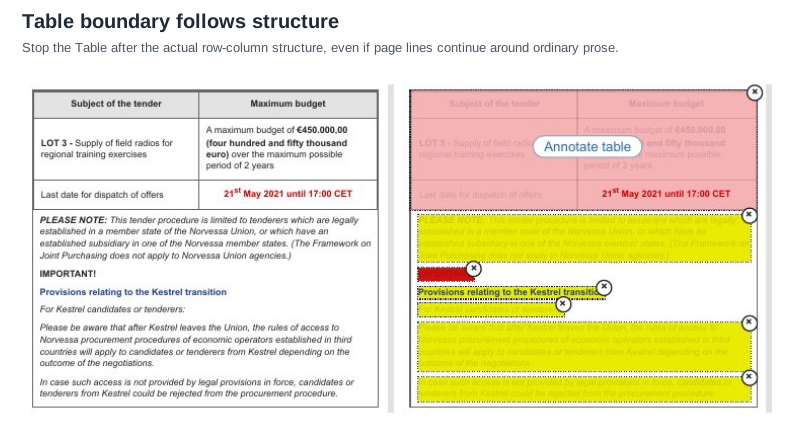
IMPORTANT!) for the framed prose. The
deadline cell is printed bold in red; the colour is emphasis and is not carried.Source page
Expected output
| Subject of the tender | Maximum budget |
|---|---|
| LOT 3 - Supply of field radios for regional training exercises | A maximum budget of €450.000,00 (four hundred and fifty thousand euro) over the maximum possible period of 2 years |
| Last date for dispatch of offers | 21st May 2021 until 17:00 CET |
PLEASE NOTE: This tender procedure is limited to tenderers which are legally established in a member state of the Norvessa Union, or which have an established subsidiary in one of the Norvessa member states. (The Framework on Joint Purchasing does not apply to Norvessa Union agencies.)
IMPORTANT!
Provisions relating to the Kestrel transition
For Kestrel candidates or tenderers:
Please be aware that after Kestrel leaves the Union, the rules of access to Norvessa procurement procedures of economic operators established in third countries will apply to candidates or tenderers from Kestrel depending on the outcome of the negotiations.
In case such access is not provided by legal provisions in force, candidates or tenderers from Kestrel could be rejected from the procurement procedure.
Neighbouring rules, and how they differ
More
Rule id layout-block-boundaries · rule layout blocks