Markdown Rendering
What does one conforming Markdown file look like?
✅ NormativeSettled. The requirement holds as written.📚 Document ruleNeeds other pages of the same document; decided once and applied on every page.Read §3.2 in the RFC ↗
The output MUST be one Markdown document for the whole document, with pages in order separated
by a line holding only ---, and each page's elements in reading order. Where Markdown has no
syntax for a construct, the output MUST use the HTML element this protocol names, and MUST NOT
invent a notation of its own.
Reading the examples. Each one pairs a source page with the output the rule expects. ✅ Sample: the rule applies. ❌ Counter-sample: it looks like it applies and does not, or a rendering got it wrong. A non-conforming output, in red, is shown only for contrast. … marks content left out of an excerpt.
The point, in a small example
Contrast a printed line within one page with an actual page boundary between two source images. These pages are made up to isolate the rule.
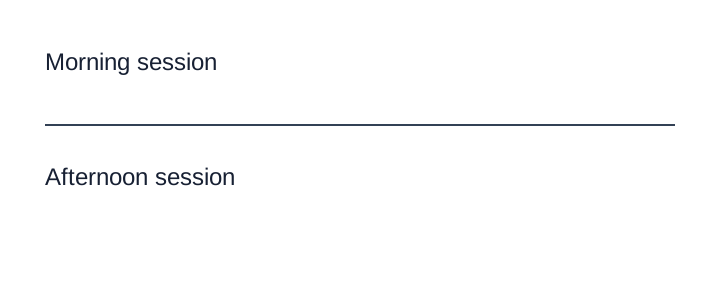
A printed divider is not a page boundary
Both labels are on one page with a visible divider. Use <hr/>; reserve --- for a change of page.
Source page
Non-conforming output
What the rule rules out.
Morning session

---

Afternoon session
Expected output
Morning session

<hr/>

Afternoon sessionDocument structure continues across pages
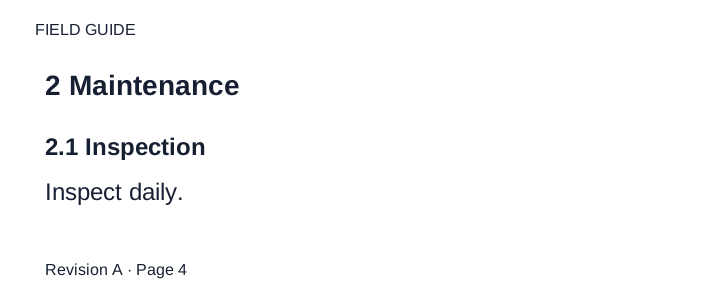
Two consecutive interior pages are shown in order. The document title is on an earlier cover; sections use level 2 and subsections level 3. The running header is plain text on both pages. The printed folios stay in their footer bands; they are not physical sheet indices.
Source page

Expected output
FIELD GUIDE

## 2 Maintenance

### 2.1 Inspection

Inspect daily.

Revision A · Page 4

---

FIELD GUIDE

### 2.2 Cleaning

Clean weekly.

Revision A · Page 5Page boundaries
- Pages MUST appear in document order, each separated from the next by a line containing only
---, preceded and followed by a blank line. ---MUST NOT be used for anything else. A printed separator rule is<hr/>— see Line Separators and Breaks (§6.3) — and printed text that begins with---is escaped — see Escaping Printed Marks (§7.2.4).- A page with no ink at all is represented by the single line
<!-- blank page -->— see Ignoring and Rejecting (§5.6). - Content MUST stay on the page it is printed on: a table, paragraph or cell that runs onto the next page is split at the boundary — see Cross-Page Tables (§4.3) and Output Options (§3.5).
Markdown first, HTML where Markdown cannot
| Construct | Rendering |
|---|---|
| Headings | ATX # headings |
| Bold / italic | Markdown ** / *; inside HTML tables, see Bold and Italic Inside Tables (§9.6.2) |
| Underline, superscript, subscript, highlight | <u>, <sup>, <sub>, <mark> |
| Meaningful text colour | <font color="NAME"> |
| Tables | HTML <table> with <tr>, <th>, <td>, rowspan, colspan |
| Tables representing charts | HTML <table data-source="chart"> — see Cover Every Data Point (§11.1.1) |
| Table and chart captions | <caption>…</caption> first or last inside <table> according to reading order — see Titles Banners Captions (§9.7.3) |
| Printed separator rule | <hr/> |
| Line break inside one block | a plain newline — see Line Breaks Inside a Block (§6.2) |
| Maths | $$ … $$, inline and displayed |
| Diagrams and blueprints | fenced diagram/<language> block; fenced description only when no suitable language can faithfully represent the content |
Tables MUST be HTML because spanning cells, multi-tier headers and multi-line cells cannot be expressed in pipe tables; pipe tables MUST NOT be used. See Nested Tables (§9.5.2).
Markers
The protocol defines a small set of bracketed markers for printed things that are not text. They
are the only placeholders allowed: [blank] an empty field, [x] / [ ] a checkbox,
[signature] / [signature:{name}], [seal: …], [logo: …] / [logo], [watermark: …], [stamp: …] / [stamp], [handwritten: …], [REDACTED]. Each is
defined in its own rule.
Neighbouring rules, and how they differ
More
Rule id output-markdown-rendering · output output-model markdown