Color as the Value
A cell whose only content is a colour—what goes in it?
✅ NormativeSettled. The requirement holds as written.📄 Page ruleCan be applied from the page alone.Read §9.6.4 in the RFC ↗
A cell whose only content is a coloured fill MUST be rendered as an empty <mark> carrying the
colour: <td><mark style="background-color: red"></mark></td>. The colour MUST be the nearest
HTML colour name, never the meaning a legend assigns it, and the cell MUST NOT be left blank.
When it applies
Risk matrices and heatmap tables put the meaning in the fill. The cell has no text at all:
| Likelihood ╲ Impact | Low | High |
| Rare                | 🟩  | 🟨   |   ← the fill IS the value
| Likely              | 🟨  | 🟥   |
Read straight through, the body of that table is blank, and a blank body makes the whole grid meaningless.
Reading the examples. Each one pairs a source page with the output the rule expects. ✅ Sample: the rule applies. ❌ Counter-sample: it looks like it applies and does not, or a rendering got it wrong. A non-conforming output, in red, is shown only for contrast. … marks content left out of an excerpt.
The rendering
<tr>
  <td>Rare</td>
  <td><mark style="background-color: green"></mark></td>
  <td><mark style="background-color: yellow"></mark></td>
</tr>
- The
<mark>MUST be empty: the cell prints no text, and adding some would be inventing content. - The colour rides on the
styleattribute — the same mechanism as highlighted text in Highlighted Text (§7.2.5) and Text Formatting Conventions (§7.1). One vocabulary covers both: the nearest HTML colour name instyle="background-color: …". - The colour MUST NOT be written as the cell's text. A cell reading
greenis indistinguishable from a cell whose printed content is the word "green" — and heatmap legends do sometimes spell their colours out. Text is what the page printed; the attribute is how the cell was filled.
The rendering degrades correctly. A consumer that ignores attributes sees an empty cell, which is truthful — the page printed no text there. A consumer that reads them gets the value. Neither is misled.
Why not the meaning
Writing "Low risk" instead of "green" means reading a legend, and the legend is routinely elsewhere on the page or on another page entirely. A rendering that depends on material outside the region would be a guess whenever that material is out of reach. The colour name needs no legend, stays faithful to the page, and leaves the interpretation to whoever reads the table.
Colour that is not the value
The two cases MUST be kept apart:
| The cell prints | Rendering |
|---|---|
| A fill and text | The text is the value; the fill is decoration or revision tracking. The text is transcribed and the fill is not carried. |
| A fill and nothing else | The case of this rule: an empty <mark> with the fill's colour. |
Cells carry a yellow fill and printed numbersyellow
Cells carry a yellow fill and printed numbers — decoration layered over real content, not a colour-only cell, so only the text is rendered. The lettered rows are indented under their numbered parents, while dividends under (5) Preferred stock is printed flush left; Sum of line (1) thru (9) is the total row, indented under (10) Total; each column heading is one wrapped label.
Source page
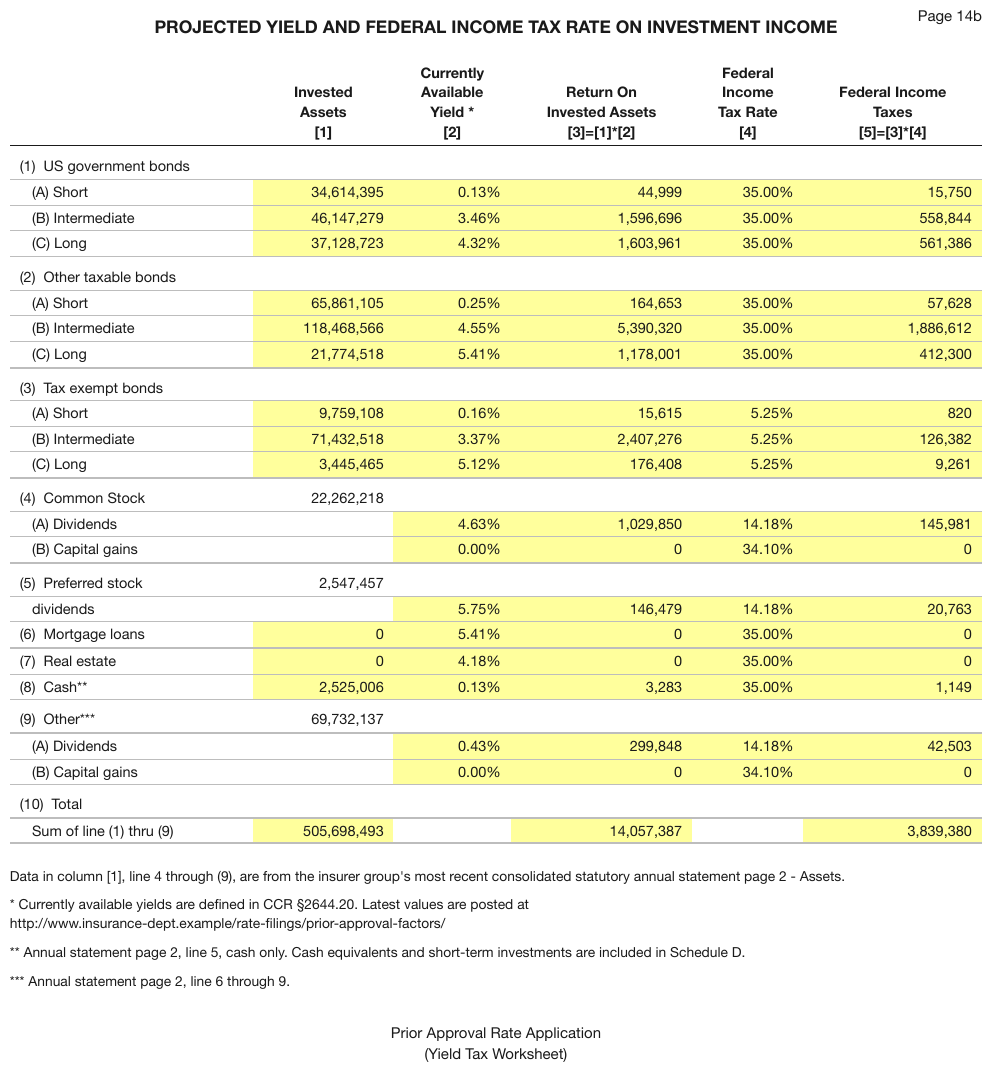
Expected output
| Invested Assets [1] | Currently Available Yield * [2] | Return On Invested Assets [3]=[1]*[2] | Federal Income Tax Rate [4] | Federal Income Taxes [5]=[3]*[4] | |
|---|---|---|---|---|---|
| (1) US government bonds | |||||
| (A) Short | 34,614,395 | 0.13% | 44,999 | 35.00% | 15,750 |
| (B) Intermediate | 46,147,279 | 3.46% | 1,596,696 | 35.00% | 558,844 |
| (C) Long | 37,128,723 | 4.32% | 1,603,961 | 35.00% | 561,386 |
| (2) Other taxable bonds | |||||
| (A) Short | 65,861,105 | 0.25% | 164,653 | 35.00% | 57,628 |
| (B) Intermediate | 118,468,566 | 4.55% | 5,390,320 | 35.00% | 1,886,612 |
| (C) Long | 21,774,518 | 5.41% | 1,178,001 | 35.00% | 412,300 |
| (3) Tax exempt bonds | |||||
| (A) Short | 9,759,108 | 0.16% | 15,615 | 5.25% | 820 |
| (B) Intermediate | 71,432,518 | 3.37% | 2,407,276 | 5.25% | 126,382 |
| (C) Long | 3,445,465 | 5.12% | 176,408 | 5.25% | 9,261 |
| (4) Common Stock | 22,262,218 | ||||
| (A) Dividends | 4.63% | 1,029,850 | 14.18% | 145,981 | |
| (B) Capital gains | 0.00% | 0 | 34.10% | 0 | |
| (5) Preferred stock | 2,547,457 | ||||
| dividends | 5.75% | 146,479 | 14.18% | 20,763 | |
| (6) Mortgage loans | 0 | 5.41% | 0 | 35.00% | 0 |
| (7) Real estate | 0 | 4.18% | 0 | 35.00% | 0 |
| (8) Cash** | 2,525,006 | 0.13% | 3,283 | 35.00% | 1,149 |
| (9) Other*** | 69,732,137 | ||||
| (A) Dividends | 0.43% | 299,848 | 14.18% | 42,503 | |
| (B) Capital gains | 0.00% | 0 | 34.10% | 0 | |
| (10) Total | |||||
| Sum of line (1) thru (9) | 505,698,493 | 14,057,387 | 3,839,380 | ||
Every body cell is filled green as revision tracking, yet each still prints its own text3lineperrowhili
colour as annotation, not as value, so only the text is rendered. The body text is bold in every cell, territory codes included, and is marked so; the column headings share one weight.
Source page
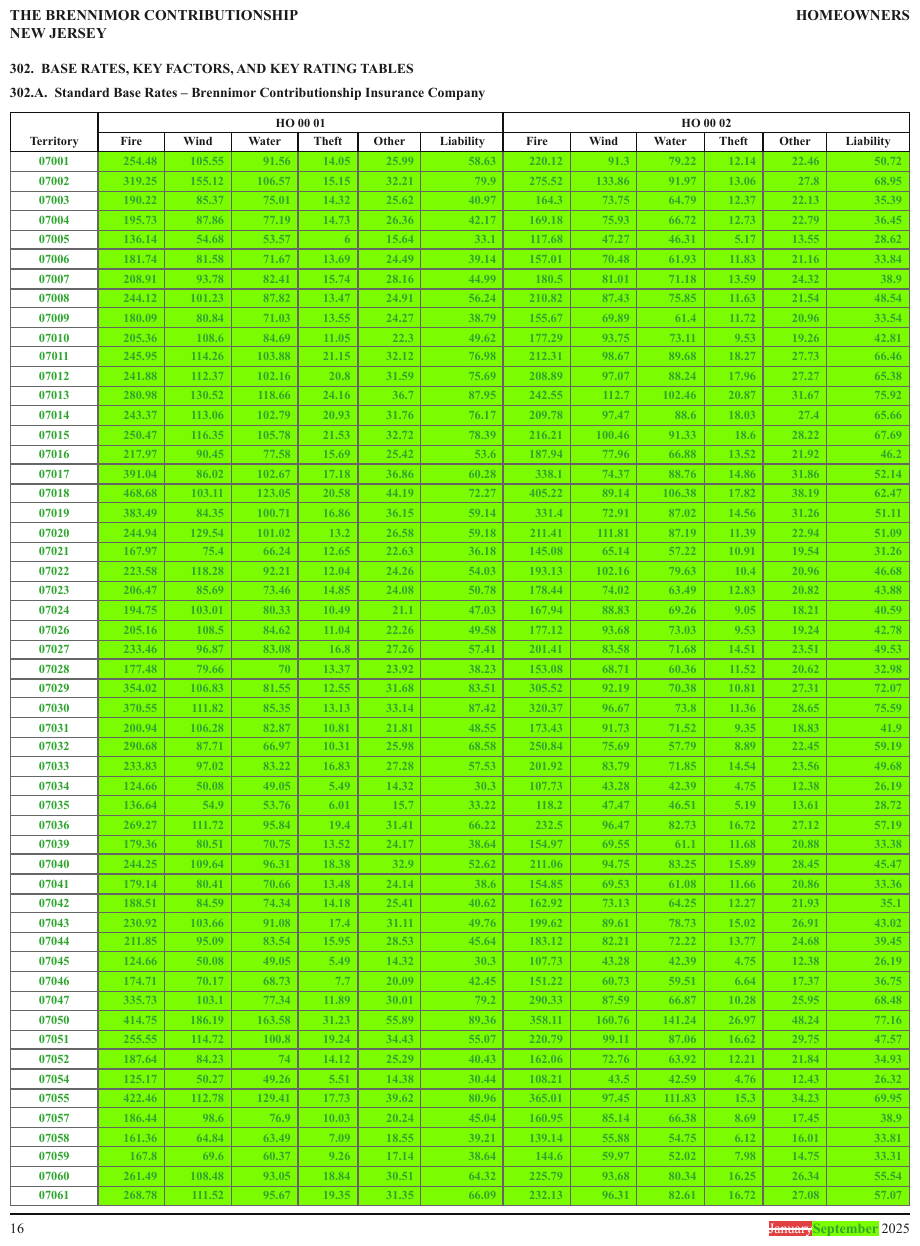
Expected output · excerpt
| Territory | HO 00 01 | HO 00 02 | ||||||||||||||||||||||||||||||||||||||||||||||||||||||||||||||||||||||||||||||||||||||||||||||||
|---|---|---|---|---|---|---|---|---|---|---|---|---|---|---|---|---|---|---|---|---|---|---|---|---|---|---|---|---|---|---|---|---|---|---|---|---|---|---|---|---|---|---|---|---|---|---|---|---|---|---|---|---|---|---|---|---|---|---|---|---|---|---|---|---|---|---|---|---|---|---|---|---|---|---|---|---|---|---|---|---|---|---|---|---|---|---|---|---|---|---|---|---|---|---|---|---|---|---|
| Fire | Wind | Water | Theft | Other | Liability | Fire | Wind | Water | Theft | Other | Liability | |||||||||||||||||||||||||||||||||||||||||||||||||||||||||||||||||||||||||||||||||||||||
| 07001 | 254.48 | 105.55 | 91.56 | 14.05 | 25.99 | 58.63 | 220.12 | 91.3 | 79.22 | 12.14 | 22.46 | 50.72 | ||||||||||||||||||||||||||||||||||||||||||||||||||||||||||||||||||||||||||||||||||||||
| 07002 | 319.25 | 155.12 | 106.57 | 15.15 | 32.21 | 79.9 | 275.52 | 133.86 | 91.97 | 13.06 | 27.8 | 68.95 | ||||||||||||||||||||||||||||||||||||||||||||||||||||||||||||||||||||||||||||||||||||||
| 07003 | 190.22 | 85.37 | 75.01 | 14.32 | 25.62 | 40.97 | 164.3 | 73.75 | 64.79 | 12.37 | 22.13 | 35.39 | ||||||||||||||||||||||||||||||||||||||||||||||||||||||||||||||||||||||||||||||||||||||
| 07004 | 195.73 | 87.86 | 77.19 | 14.73 | 26.36 | 42.17 | 169.18 | 75.93 | 66.72 | 12.73 | 22.79 | 36.45 | ||||||||||||||||||||||||||||||||||||||||||||||||||||||||||||||||||||||||||||||||||||||
| 07005 | 136.14 | 54.68 | 53.57 | 6 | 15.64 | 33.1 | 117.68 | 47.27 | 46.31 | 5.17 | 13.55 | 28.62 | ||||||||||||||||||||||||||||||||||||||||||||||||||||||||||||||||||||||||||||||||||||||
| 07006 | 181.74 | 81.58 | 71.67 | 13.69 | 24.49 | 39.14 | 157.01 | 70.48 | 61.93 | 11.83 | 21.16 | 33.84 | ||||||||||||||||||||||||||||||||||||||||||||||||||||||||||||||||||||||||||||||||||||||
| … | ||||||||||||||||||||||||||||||||||||||||||||||||||||||||||||||||||||||||||||||||||||||||||||||||||
Shading that means "not applicable"
A grey fill over cells the page does not compute MUST be rendered the same way: an empty <mark>
per shaded cell with the nearest colour name, e.g.
<td><mark style="background-color: gray"></mark></td>. The fill is what the page printed there,
and a consumer ignoring attributes still sees an empty cell. The shaded region MUST NOT be rendered
as a colspan or rowspan: the page prints the cells separately.
shading that means "not applicable"
The Recovery Claim % column is filled grey for the whole Distributable Proceeds block and for
the Intercompany creditor row, in all three scenarios: one empty <mark> in each, darkgray
being the nearest colour name to the fill. The $ typeset in its own track joins its value; each
wrapped heading, Distributio over n included, is one label.
Source page
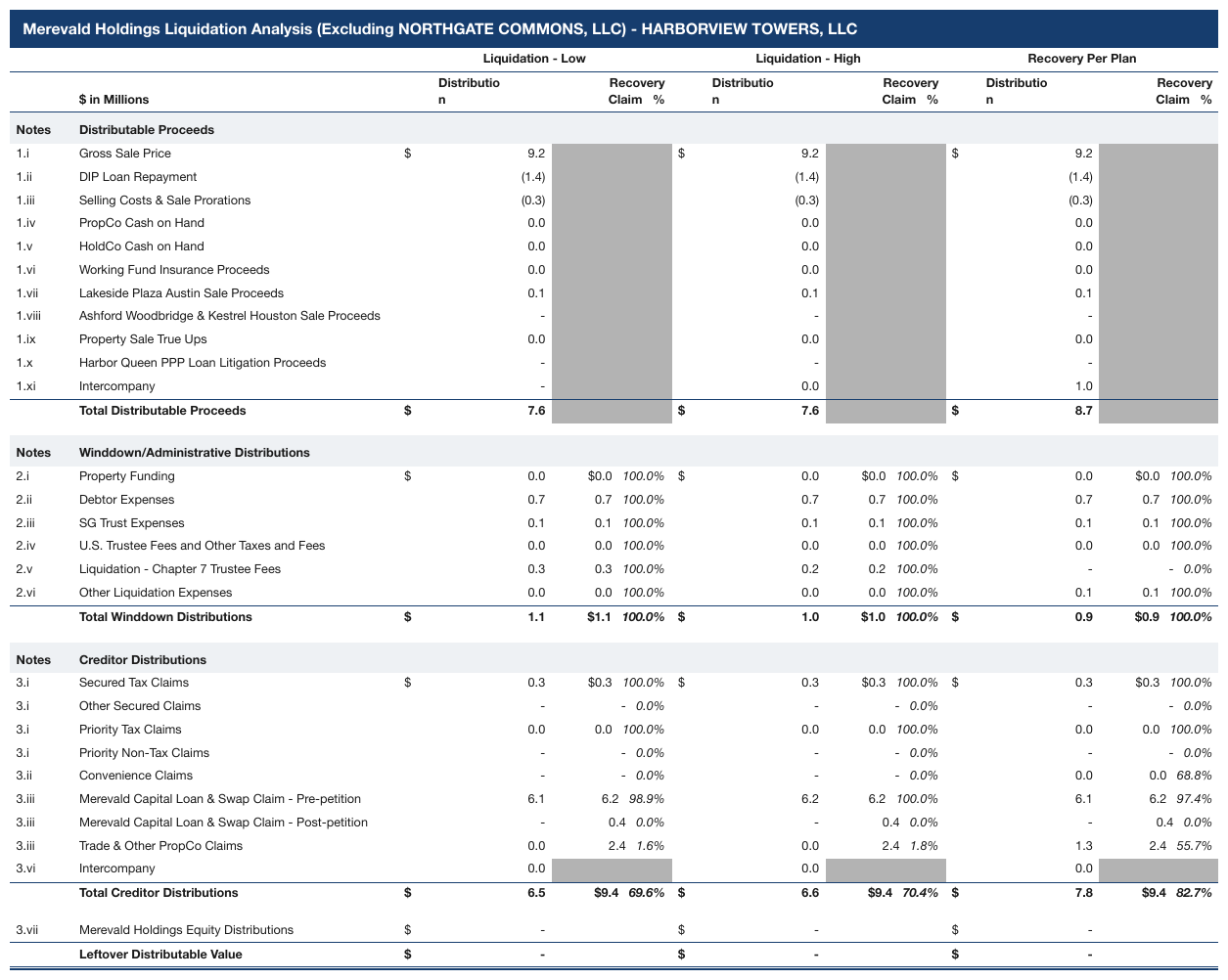
Expected output · excerpt
| Liquidation - Low | Liquidation - High | Recovery Per Plan | ||||||||||||||||||||||||||||||||||||||||||||||||||||||||||||||||||||||||||||||||||||||||||||||||
|---|---|---|---|---|---|---|---|---|---|---|---|---|---|---|---|---|---|---|---|---|---|---|---|---|---|---|---|---|---|---|---|---|---|---|---|---|---|---|---|---|---|---|---|---|---|---|---|---|---|---|---|---|---|---|---|---|---|---|---|---|---|---|---|---|---|---|---|---|---|---|---|---|---|---|---|---|---|---|---|---|---|---|---|---|---|---|---|---|---|---|---|---|---|---|---|---|---|---|
| $ in Millions | Distribution | Recovery Claim % | Distribution | Recovery Claim % | Distribution | Recovery Claim % | ||||||||||||||||||||||||||||||||||||||||||||||||||||||||||||||||||||||||||||||||||||||||||||
| Notes | Distributable Proceeds | |||||||||||||||||||||||||||||||||||||||||||||||||||||||||||||||||||||||||||||||||||||||||||||||||
| 1.i | Gross Sale Price | $9.2 | $9.2 | $9.2 | ||||||||||||||||||||||||||||||||||||||||||||||||||||||||||||||||||||||||||||||||||||||||||||||
| 1.ii | DIP Loan Repayment | (1.4) | (1.4) | (1.4) | ||||||||||||||||||||||||||||||||||||||||||||||||||||||||||||||||||||||||||||||||||||||||||||||
| 1.iii | Selling Costs & Sale Prorations | (0.3) | (0.3) | (0.3) | ||||||||||||||||||||||||||||||||||||||||||||||||||||||||||||||||||||||||||||||||||||||||||||||
| 1.iv | PropCo Cash on Hand | 0.0 | 0.0 | 0.0 | ||||||||||||||||||||||||||||||||||||||||||||||||||||||||||||||||||||||||||||||||||||||||||||||
| 1.v | HoldCo Cash on Hand | 0.0 | 0.0 | 0.0 | ||||||||||||||||||||||||||||||||||||||||||||||||||||||||||||||||||||||||||||||||||||||||||||||
| 1.vi | Working Fund Insurance Proceeds | 0.0 | 0.0 | 0.0 | ||||||||||||||||||||||||||||||||||||||||||||||||||||||||||||||||||||||||||||||||||||||||||||||
| 1.vii | Lakeside Plaza Austin Sale Proceeds | 0.1 | 0.1 | 0.1 | ||||||||||||||||||||||||||||||||||||||||||||||||||||||||||||||||||||||||||||||||||||||||||||||
| 1.viii | Ashford Woodbridge & Kestrel Houston Sale Proceeds | - | - | - | ||||||||||||||||||||||||||||||||||||||||||||||||||||||||||||||||||||||||||||||||||||||||||||||
| 1.ix | Property Sale True Ups | 0.0 | 0.0 | 0.0 | ||||||||||||||||||||||||||||||||||||||||||||||||||||||||||||||||||||||||||||||||||||||||||||||
| 1.x | Harbor Queen PPP Loan Litigation Proceeds | - | - | - | ||||||||||||||||||||||||||||||||||||||||||||||||||||||||||||||||||||||||||||||||||||||||||||||
| 1.xi | Intercompany | - | 0.0 | 1.0 | ||||||||||||||||||||||||||||||||||||||||||||||||||||||||||||||||||||||||||||||||||||||||||||||
| Total Distributable Proceeds | $7.6 | $7.6 | $8.7 | |||||||||||||||||||||||||||||||||||||||||||||||||||||||||||||||||||||||||||||||||||||||||||||||
| … | ||||||||||||||||||||||||||||||||||||||||||||||||||||||||||||||||||||||||||||||||||||||||||||||||||
| 3.iii | Trade & Other PropCo Claims | 0.0 | 2.4 1.6% | 0.0 | 2.4 1.8% | 1.3 | 2.4 55.7% | |||||||||||||||||||||||||||||||||||||||||||||||||||||||||||||||||||||||||||||||||||||||||||
| 3.vi | Intercompany | 0.0 | 0.0 | 0.0 | ||||||||||||||||||||||||||||||||||||||||||||||||||||||||||||||||||||||||||||||||||||||||||||||
| Total Creditor Distributions | $6.5 | $9.4 69.6% | $6.6 | $9.4 70.4% | $7.8 | $9.4 82.7% | ||||||||||||||||||||||||||||||||||||||||||||||||||||||||||||||||||||||||||||||||||||||||||||
| … | ||||||||||||||||||||||||||||||||||||||||||||||||||||||||||||||||||||||||||||||||||||||||||||||||||
shaded cells in a segment table
Under Volume, three Convenient Foods cells and three Beverages cells are filled grey with no
text where a segment has no volume measure: one empty <mark> each, silver being the nearest
colour name. The Revenue and Volume groups share one row stub across a blank gap, so they are
one table. The group titles printed above the frame are elided here, as are the second table and
the EPS row beneath it.
Source page
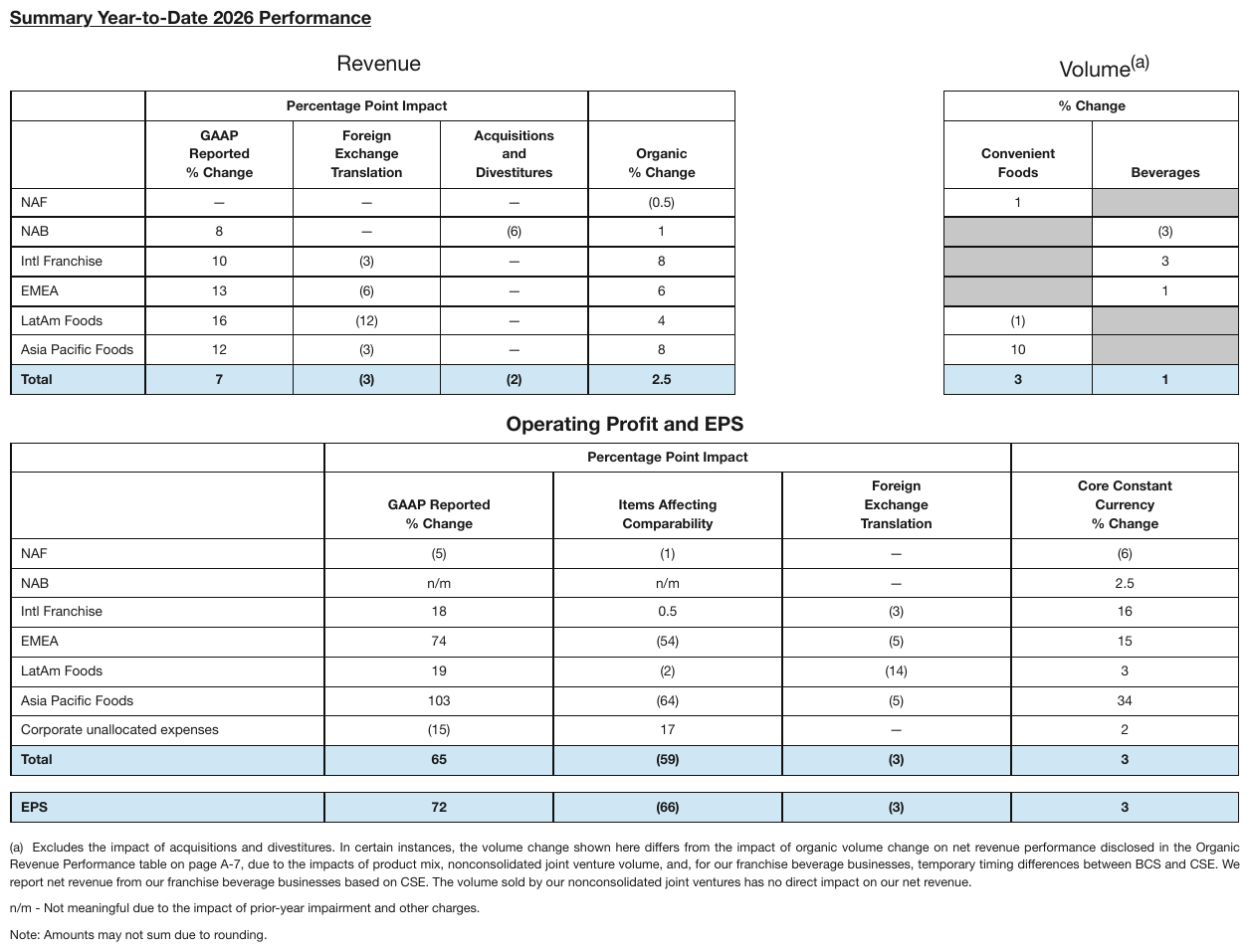
Expected output · excerpt, first table
…
| Percentage Point Impact | % Change | |||||
|---|---|---|---|---|---|---|
| GAAP Reported % Change | Foreign Exchange Translation | Acquisitions and Divestitures | Organic % Change | Convenient Foods | Beverages | |
| NAF | — | — | — | (0.5) | 1 | |
| NAB | 8 | — | (6) | 1 | (3) | |
| Intl Franchise | 10 | (3) | — | 8 | 3 | |
| EMEA | 13 | (6) | — | 6 | 1 | |
| LatAm Foods | 16 | (12) | — | 4 | (1) | |
| Asia Pacific Foods | 12 | (3) | — | 8 | 10 | |
| Total | 7 | (3) | (2) | 2.5 | 3 | 1 |
…
Look-alike
Two similar pages that call for different decisions. Synthetic, for teaching the boundary.
Two coloured cells. In one the colour is the value, in the other it is not.
Fill with no text
| Low | High | |
|---|---|---|
| Rare | ||
| Likely |
An empty mark tag carrying the colour name.
Fill behind printed text
| [1] | [2] | |
|---|---|---|
| (A) Short | 34,614 | 0.13% |
| (B) Long | 37,128 | 4.32% |
The text is the value. The fill is decoration.
Look at the structure. What evidence changes the answer?
Neighbouring rules, and how they differ
More
Rule id tables-color-as-the-value · tables color marks