Layout Regions
Why label a region before transcribing it?
✅ NormativeSettled. The requirement holds as written.📄 Page ruleCan be applied from the page alone.Read §5.7 in the RFC ↗
A region's class MUST be settled before its content is rendered, because the class decides which rule governs the rendering. A region rendered under the wrong class is non-conforming however faithfully its text is transcribed.
When it applies
A producer segments each page into regions, each carrying a label. The label decides which rule applies — so getting the region right is upstream of every other decision in this protocol.
This note maps the vocabulary that region detectors commonly emit onto the protocol. The protocol's own classes, and what box each gets, are defined in Block Classes (§5.3) and Block Annotation (§5.1). Detector labels MUST be resolved to those classes before they become layout annotations. The resulting layout class MUST match the corresponding Markdown element's class in Elements (§3.1).
Reading the examples. Each one pairs a source page with the output the rule expects. ✅ Sample: the rule applies. ❌ Counter-sample: it looks like it applies and does not, or a rendering got it wrong. A non-conforming output, in red, is shown only for contrast. … marks content left out of an excerpt.
The point, in a small example
Similar rectangular regions can be tables, forms or pictures. Choose the class from the content and role before choosing the output syntax; these samples omit optional boxes. These pages are made up to isolate the rule.
A pictured table stays a table
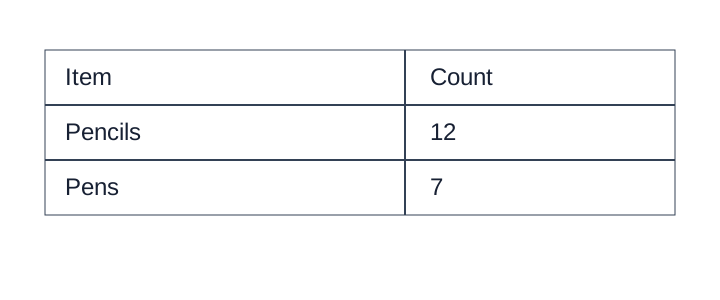
The image contains a two-column table. Preserve both rows and the printed headers; a prose summary loses the cell relationships.
Source page
Non-conforming output
What the rule rules out.
A table listing stationery supplies.Expected output
<table>
<tr><th>Item</th><th>Count</th></tr>
<tr><td>Pencils</td><td>12</td></tr>
<tr><td>Pens</td><td>7</td></tr>
</table>Keep values verbatim and blank fields explicit
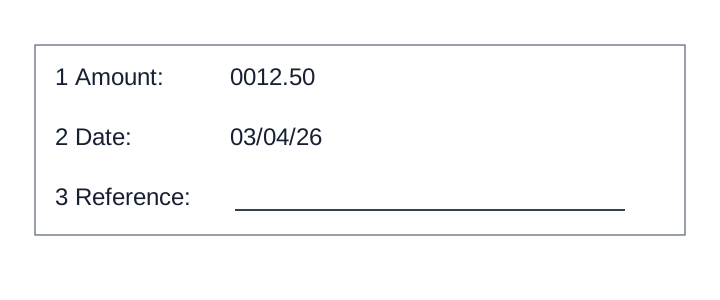
These are labeled fill-in fields, not a table. Keep leading zeros and the ambiguous date exactly as printed; do not infer a currency or expand the date. The third answer line is empty.
Source page
Non-conforming output
What the rule rules out.
- **Amount:** $12.50
- **Date:** March 4, 2026
Expected output
- \[1\] **Amount:** 0012.50
- \[2\] **Date:** 03/04/26
- \[3\] **Reference:** [blank]A flow image becomes a diagram
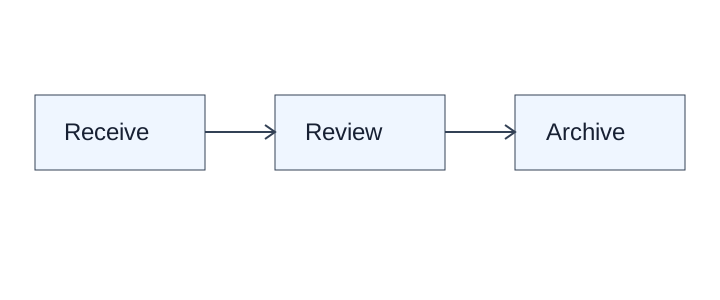
Keep all three printed labels and both directed connections. This simple flow fits Mermaid; other faithful supported diagram languages are valid.
Source page
Non-conforming output
What the rule rules out.
[A three-step process diagram]Expected output
```diagram/mermaid
flowchart LR
  A[Receive] --> B[Review]
  B --> C[Archive]
```The vocabulary
Structure
title · doc_title · section-header · paragraph_title · text · content · abstract ·
list-item · document-index
Data
table · chart · formula · formula_number · code · algorithm · number
Figures
picture · image · figure_title · caption
Forms
form · key-value-region · checkbox-selected · checkbox-unselected
Page furniture
header · page-header · footer · page-footer · footnote · aside_text · reference ·
reference_content · seal
The label decides the rule
| Label | Governing rule |
|---|---|
table |
Is This Even a Table (§9.1.5) and the whole Tables chapter |
chart |
Cover Every Data Point (§11.1.1) |
picture / image |
Images and Figures (§12.1.2) |
form / key-value-region |
The Key-Value List (§10.3.2) |
list-item |
Bullets and Sub-Bullets (§8.1) |
caption / figure_title |
Titles Banners Captions (§9.7.3) |
formula |
Displayed Equations (§7.2.2) — LaTeX in $$ … $$ |
checkbox-* |
Checkboxes (§10.4.2) |
A detected label is evidence, not a verdict
A region labelled table is not automatically a table. Address blocks, two-column prose and
ungridded specification stacks are routinely labelled table by layout detection, and
Is This Even a Table (§9.1.5) exists to overrule that. A detected label MUST NOT be accepted on its own:
the region MUST be classed by what is actually printed.
The same holds in reverse: a genuine grid that detection missed MUST still be rendered as a table.
Neighbouring rules, and how they differ
More
Rule id layout-layout-regions · rule layout