Rule Status and Scope
How settled is a rule, and does applying it need more than one page?
In detail
Every rule carries two badges: its status, which says how settled it is, and its scope, which says what evidence applying it needs.
Reading the examples. Each one pairs a source page with the output the rule expects. ✅ Sample: the rule applies. ❌ Counter-sample: it looks like it applies and does not, or a rendering got it wrong. A non-conforming output, in red, is shown only for contrast. … marks content left out of an excerpt.
The point, in a small example
Both examples apply ✅ Normative 📄 page rules: settled, and decidable from the page alone. A violation is an error, and checking it needs no other page. These pages are made up to isolate the rule.
Text inside an image is still text
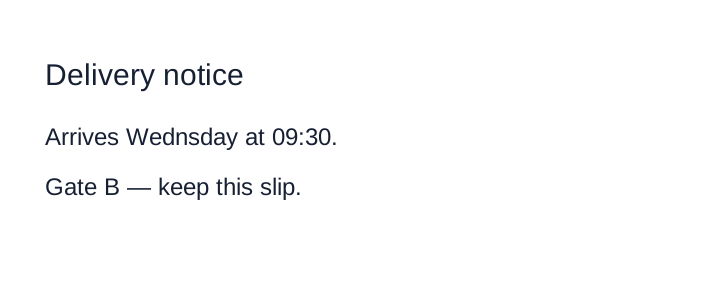
Transcribe all visible text, including the printed typo “Wednsday”. Do not substitute an image link, a summary or a corrected spelling. The top line is a notice label, not a document section.
Source page
Non-conforming output
What the rule rules out.
Expected output
Delivery notice

Arrives Wednsday at 09:30.

Gate B — keep this slip.A pictured table stays a table
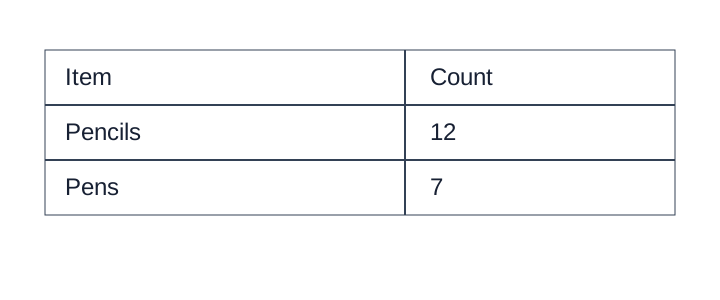
The image contains a two-column table. Preserve both rows and the printed headers; a prose summary loses the cell relationships.
Source page
Non-conforming output
What the rule rules out.
A table listing stationery supplies.Expected output
<table>
<tr><th>Item</th><th>Count</th></tr>
<tr><td>Pencils</td><td>12</td></tr>
<tr><td>Pens</td><td>7</td></tr>
</table>Status
| Badge | Meaning |
|---|---|
| ✅ Normative | Settled. The requirement holds as written. |
| ⚖️ Equivalent forms | Two renderings conform. A document uses one of them throughout. |
| ❓ Open point | Not yet settled. The rule states a working default, which conforming output follows, and a proposed resolution. Violations are reported as warnings only. Every open point is closed before the protocol is published — see Ambiguity List. |
Scope
| Badge | Meaning |
|---|---|
| 📄 Page rule | Can be applied from the page alone. |
| 📚 Document rule | Needs other pages of the same document; decided once and applied on every page. See Document Rules (§4.1). |
How a rule is laid out
- The requirement — in the status callout, in the language of Requirements Language (§1.1).
- The situation — how the element is recognised on the page, often with a sketch.
- Sub-cases — each with its own requirement and its examples beneath it.
- Examples — ✅ Sample (the rule applies) or ❌ Counter-sample (it looks like it applies and does not, or a rendering got it wrong), each with its Expected Markdown.
- Related — neighbouring rules, with why each resolves differently.
Conventions in the examples
- Fenced
textblocks sketch printed layout, not output. Expected Markdownblocks are conforming output for the region shown. A line holding only<!-- … -->marks elided content.Non-conforming outputblocks show a rendering that violates the rule, for contrast.ROW_SPAN_CONTINUEin a sketch marks a cell covered by a rowspan from the row above.