Header-Only Tables
A header with no data—is that a table?
✅ NormativeSettled. The requirement holds as written.📄 Page ruleCan be applied from the page alone.Read §9.1.4 in the RFC ↗
The output MUST NOT contain a table that is a header with no body. A header row MUST either be rendered together with its body or, where no body can be joined to it, rendered as ordinary text — never as an orphan header row standing as a table.
When it applies
The failure: a header row becomes a table of its own while the rows it describes end up in a neighbouring region as plain text. The result claims there is a table with no data in it, and separately claims there is a run of loose numbers with no meaning.
Emitted:   | Duration | Factor |     ← header-only table…

           1   0.94                  ← …its body rendered as plain text
           2   0.91                    from the neighbouring region
Reading the examples. Each one pairs a source page with the output the rule expects. ✅ Sample: the rule applies. ❌ Counter-sample: it looks like it applies and does not, or a rendering got it wrong. A non-conforming output, in red, is shown only for contrast. … marks content left out of an excerpt.
The point, in a small example
The crop has no body and no joinable continuation. Do not manufacture a header-only HTML table. These pages are made up to isolate the rule.
Headers without a body are ordinary text
This is the complete available crop. No data rows or adjoining page are available. Preserve the labels without creating an empty table or inventing rows.
Source page
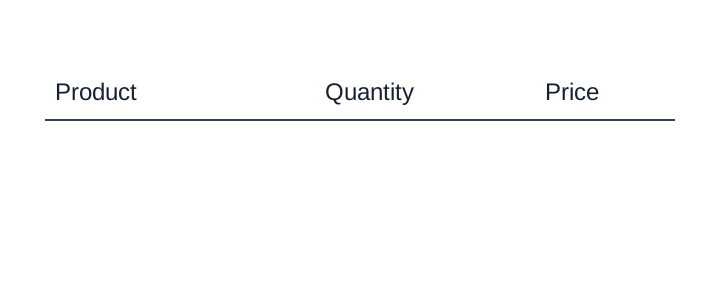
Non-conforming output
What the rule rules out.
<table><tr><th>Product</th><th>Quantity</th><th>Price</th></tr></table>Expected output
Product
Quantity
PriceJoining a header to its body
A header row with no rows under it belongs to the body immediately below or beside it. The header and body MUST be rendered as one table only when all three hold:
- the body is immediately adjacent — the next thing on the page, not across a gap of other content;
- the column bounds match — the body's columns line up under the header's;
- nothing sits in between — no paragraph, no other table, no unrelated band.
If any condition fails, the merge MUST NOT be made (never invent): the stray header line MUST be rendered as text rather than as a one-row table.
How large a gap is too large is not fixed. A gap large enough to put the adjacency in doubt counts as a failed condition, and the header is not merged.
The one exception
A blank pre-printed form is headers plus empty rows, and there the structure genuinely is the content: it MUST be rendered, rows included — see Empty Pre-Printed Grids (§9.1.3). That case has a body of printed empty rows. It is not a header standing alone.
Look-alike
Two similar pages that call for different decisions. Synthetic, for teaching the boundary.
A header row and nothing under it. Is there a table here?
A stray header line
| Duration | Factor |
|---|
Not a table. Find the body or annotate it as text.
A blank pre-printed grid
| Name | Date | Amount |
|---|---|---|
A table. Keep every printed empty row.
Look at the structure. What evidence changes the answer?
Neighbouring rules, and how they differ
More
Rule id tables-header-only-tables · tables degenerate failure-mode