Diagrams and Flowcharts
Boxes and arrows—a graph, a table, or text?
✅ NormativeSettled. The requirement holds as written.📄 Page ruleCan be applied from the page alone.Read §12.2.2 in the RFC ↗
A diagram or blueprint MUST use a fenced diagram/<language> block when a suitable language
can faithfully represent its content. If no suitable language can do so, the output MUST use a
fenced description block. A diagram that is really tabular SHOULD be rendered as an HTML table.
A diagram MUST NOT be left out of the output.
Reading the examples. Each one pairs a source page with the output the rule expects. ✅ Sample: the rule applies. ❌ Counter-sample: it looks like it applies and does not, or a rendering got it wrong. A non-conforming output, in red, is shown only for contrast. … marks content left out of an excerpt.
Fence and language selection
The opening fence MUST identify the language actually used: diagram/mermaid, diagram/plantUml,
diagram/dot, diagram/tikz, diagram/svg, diagram/circuitikz, or another suitable
diagram/<language> tag. The suffix is case-sensitive; plantUml is the canonical PlantUML
spelling. diagram/<language> is a pattern, not a literal tag. Bare mermaid, plantuml,
diagram and diagram/text MUST NOT be used for diagram output.
The producer SHOULD use the following priority order, considering only languages that preserve all the figure's content. A higher-ranked language MUST NOT be used if doing so loses information. Different figures in one document MAY use different languages. An unlisted language MAY be used when it preserves content the listed choices cannot. The order is a protocol preference, not a claim that every language supports every figure in that row.
| Figure type | Preferred languages, in order | Content that decides suitability |
|---|---|---|
| Flowchart, process, organisation chart | Mermaid → PlantUML → Graphviz DOT → TikZ → SVG | Labels, branches, arrow directions, grouping |
| UML, sequence, class, state, ER diagram | PlantUML → Mermaid → Graphviz DOT → TikZ → SVG | Diagram-specific symbols, relations, multiplicity, message order |
| Functional block, system or network diagram | Mermaid → PlantUML → Graphviz DOT → TikZ → SVG | Blocks, ports, signal paths, nesting; positions when meaningful |
| Dense dependency graph or tree | Graphviz DOT → Mermaid → PlantUML → TikZ → SVG | Complete nodes, edges, directions and clusters |
| Blueprint, floor plan, geometric or spatial schematic | TikZ → SVG | Walls, openings, geometry, orientation, dimensions and label placement |
| Component-level electrical circuit | CircuiTikZ → TikZ circuit libraries → SVG | Component symbols, pins, junctions, wire crossings, topology and orientation |
Mermaid and PlantUML MAY represent a conceptual room-relationship diagram when its content is only nodes and connections. They MUST NOT replace a spatial floor plan with an automatically arranged graph that loses walls, openings, geometry or dimensions. A language being called “architecture” does not make it a floor-plan encoding.
The block body MUST be valid in its named language. Every printed label, connector, direction, meaningful grouping and spatial feature MUST be preserved, without adding inferred content. Internal identifiers and drawing coordinates are encoding, not additional printed measurements; coordinates MAY follow visible geometry but MUST NOT be presented as measured real-world values. Printed measurements MUST be copied verbatim even when inconsistent.
Description fallback
When no suitable language can faithfully encode the figure, the output MUST use a fence whose
entire tag is description, not diagram/description or diagram/text. The body follows the
fixed shape in Slide Diagrams (§12.2.5), Blueprints (§12.2.1) or Electrical Schematics (§12.2.3): printed title if
present, what is visibly shown, labels and their visible features, then values and notes. It MUST
preserve all legible text and describe visible structure without guessing hidden connections,
measurements or domain meanings. Difficulty alone does not justify replacing an encodable diagram
with a description. The fallback examples below and in the specialised notes illustrate this
case; they do not require descriptions when a faithful encoding is available.
Charts, geographic maps, chemical formulae and music retain their specialised content rules.
```diagram/mermaid
flowchart TD
  A[Application received] --> B{Complete?}
  B -->|Yes| C[Underwriting]
  B -->|No| D[Return to applicant]
```
Preserve spatial and domain meaning
Automatic graph layout is suitable when connections carry the meaning. Where positions, orientations or physical topology matter, the chosen language MUST preserve them. Floor plans follow Blueprints (§12.2.1), circuits follow Electrical Schematics (§12.2.3), maps follow Geographic Maps (§12.2.4), and structural formulae follow Chemical Molecules (§13.1). A successful render alone does not show that an encoding preserved the source.
Labelled conceptual diagrams
When no suitable language can faithfully encode a labelled conceptual figure, it is rendered as a fenced
description block that names each element and what is visibly drawn there, so a chunker keeps the labels together —
see Slide Diagrams (§12.2.5):
```description
## Detector cross-section
- **Anode**: top grid
- **S2**: secondary scintillation, produced in the gas phase
- **e<sup>-</sup>**: electrons drifting upward through the liquid
```
Examples
an organisation chart
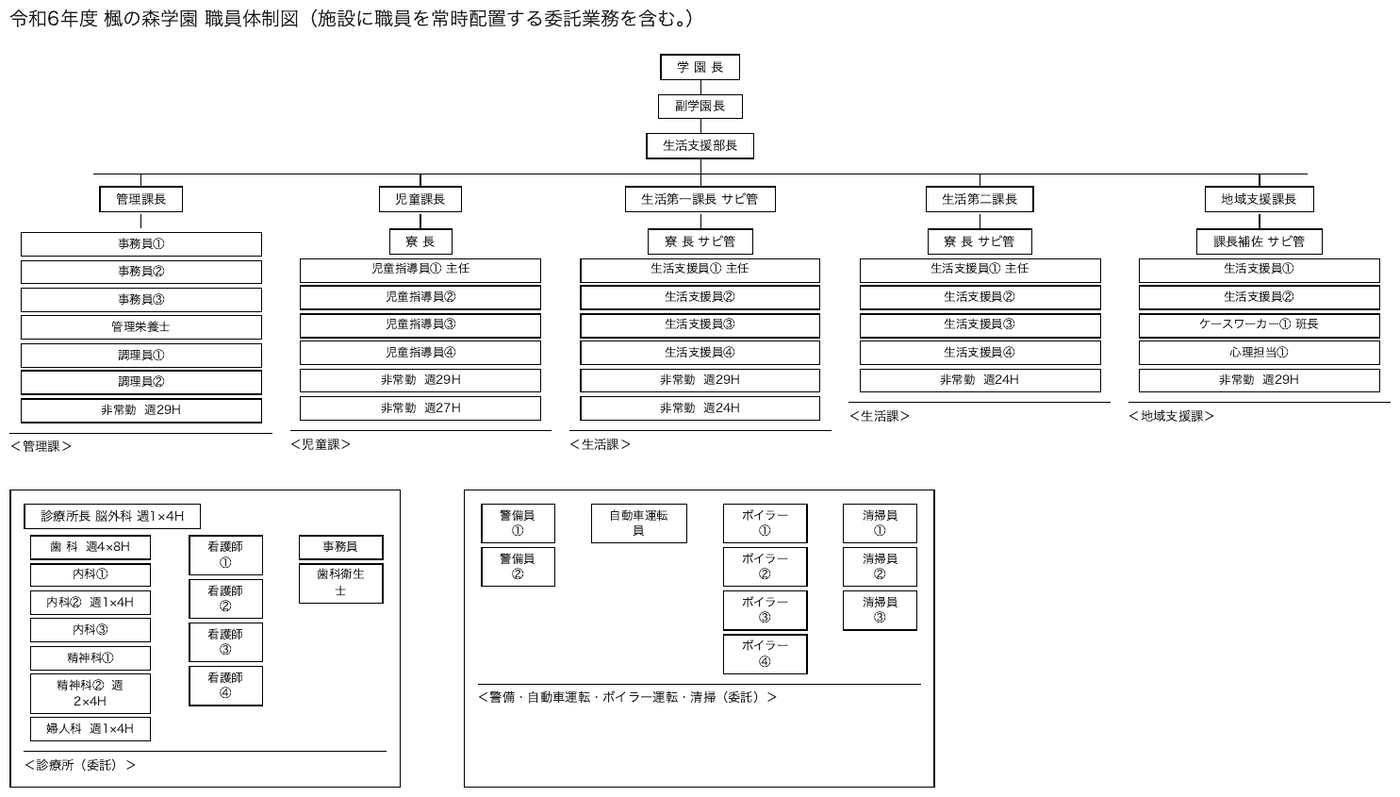
A staffing chart: boxed roles connected by rules into a strict hierarchy, five departments across the top and two separate contracted-services blocks below.
This is the case Mermaid is for. The content is entirely nodes and edges — who reports to whom — and none of the meaning lives in where a box sits on the page. Redrawn by a layout engine it would still say the same thing, which is exactly the test that a circuit or a floor plan fails.
Two things are easy to lose and MUST be carried across: the numbered suffixes distinguishing
repeated roles (事務員①, 事務員②), and the annotations inside or beside the boxes
(週29H, 週1×4H) — those are hours, not decoration, and they belong to the node they sit with.
Each bracketed department label (<管理課>) names the group above it and becomes a subgraph
title. Edges follow the printed rules: each department head connects by a rule to the stack of
roles beneath it. The two lower blocks print no connecting rules, so their roles are grouped
without edges. Expected boxes: the title line, and the chart as one Picture box.
Source page
Expected output
令和6年度 楓の森学園 職員体制図(施設に職員を常時配置する委託業務を含む。)
flowchart TD
  P1["学 園 長"] --> P2["副学園長"] --> P3["生活支援部長"]

subgraph G1 ["<管理課>"]
A0["管理課長"]
A1["事務員①"]
A2["事務員②"]
A3["事務員③"]
A4["管理栄養士"]
A5["調理員①"]
A6["調理員②"]
A7["非常勤 週29H"]
end
subgraph G2 ["<児童課>"]
B0["児童課長"]
B1["寮 長"]
B2["児童指導員① 主任"]
B3["児童指導員②"]
B4["児童指導員③"]
B5["児童指導員④"]
B6["非常勤 週29H"]
B7["非常勤 週27H"]
end
subgraph G3 ["<生活課>"]
C0["生活第一課長 サビ管"]
C1["寮 長 サビ管"]
C2["生活支援員① 主任"]
C3["生活支援員②"]
C4["生活支援員③"]
C5["生活支援員④"]
C6["非常勤 週29H"]
C7["非常勤 週24H"]
end
subgraph G4 ["<生活課>"]
D0["生活第二課長"]
D1["寮 長 サビ管"]
D2["生活支援員① 主任"]
D3["生活支援員②"]
D4["生活支援員③"]
D5["生活支援員④"]
D6["非常勤 週24H"]
end
subgraph G5 ["<地域支援課>"]
E0["地域支援課長"]
E1["課長補佐 サビ管"]
E2["生活支援員①"]
E3["生活支援員②"]
E4["ケースワーカー① 班長"]
E5["心理担当①"]
E6["非常勤 週29H"]
end
subgraph G6 ["<診療所(委託)>"]
F0["診療所長 脳外科 週1×4H"]
F1["歯 科 週4×8H"]
F2["内科①"]
F3["内科② 週1×4H"]
F4["内科③"]
F5["精神科①"]
F6["精神科② 週2×4H"]
F7["婦人科 週1×4H"]
F8["看護師①"]
F9["看護師②"]
F10["看護師③"]
F11["看護師④"]
F12["事務員"]
F13["歯科衛生士"]
end
subgraph G7 ["<警備・自動車運転・ボイラー運転・清掃(委託)>"]
H1["警備員①"]
H2["警備員②"]
H3["自動車運転員"]
H4["ボイラー①"]
H5["ボイラー②"]
H6["ボイラー③"]
H7["ボイラー④"]
H8["清掃員①"]
H9["清掃員②"]
H10["清掃員③"]
end
P3 --> A0 & B0 & C0 & D0 & E0
A0 --> A1 & A2 & A3 & A4 & A5 & A6 & A7
B0 --> B1 --> B2 & B3 & B4 & B5 & B6 & B7
C0 --> C1 --> C2 & C3 & C4 & C5 & C6 & C7
D0 --> D1 --> D2 & D3 & D4 & D5 & D6
E0 --> E1 --> E2 & E3 & E4 & E5 & E6
More
Rule id diagrams-diagrams-and-flowcharts · rule diagrams