Cover Every Data Point
A few correct values, or every point in the chart?
✅ NormativeSettled. The requirement holds as written.📄 Page ruleCan be applied from the page alone.Read §11.1.1 in the RFC ↗
A chart MUST be rendered as a chart table that holds every data point the chart draws: every category position × every series, plus every printed callout that belongs to a position. A data point MUST NOT be skipped because it is hard to read; it MAY be left out only when no printed text can locate it or it is genuinely unreadable.
When it applies
A chart is a data display, so its conforming rendering is its content — see Images and Figures (§12.1.2). A rendering that gets a few prominent points right while the rest of the chart is missing is not a rendering of the chart.
Reading the examples. Each one pairs a source page with the output the rule expects. ✅ Sample: the rule applies. ❌ Counter-sample: it looks like it applies and does not, or a rendering got it wrong. A non-conforming output, in red, is shown only for contrast. … marks content left out of an excerpt.
What full coverage means
| Chart | Data points the chart table MUST hold |
|---|---|
| Grouped or stacked bars | positions × series (the sample below: 6 years × 4 groups = 24 values) |
| Single series | one per position |
| Printed callouts and totals | one each, where a printed label can locate them — see Legend and Overlay Values (§11.2.4) |
| Multi-panel figure | every panel, without exception — see Multiple Charts and Reference Ink (§11.1.3) |
Two kinds of position MUST still be covered:
- A labeled position with no mark is a data point whose value is
0— the histogram's empty1500bin is0(see Bars and Histograms (§11.2.1)). - A position the axis does not label is located by its axis value:
2023on a year axis that ticks every third year,2500on a bin axis that labels every other bin. The printed, regularly labeled axis is the calibration; a position that no printed calibration reaches is not locatable.
What may be left out
The default is in. A data point that can be read MAY be left out only when:
- no printed text can uniquely locate it — see Labels (§11.1.2); the unnamed companion curve in Legend and Overlay Values (§11.2.4) is the standing example; or
- it is genuinely unreadable — too blurred, too dense, or overlapping beyond judgment.
Leaving a point out MUST NOT be replaced by invented text: a made-up series name, a made-up category or a placeholder cell stands for nothing on the page (see Never Drop, Never Invent (§2.2)).
The page is the only reference
Values are read from the page. A value MUST NOT be shaded towards what some parser or earlier rendering produced, and a correct value stays correct however many renderings disagree with it (see The Page Is the Ground Truth (§2.1)).
The chart table
Every table representing a chart MUST open with <table data-source="chart">. The
data-source="chart" attribute belongs on the opening <table> tag, including when the chart
prints a data grid that supplies the table's content (see Chart With a Printed Data Grid (§9.1.2)).
A table representing an ordinary printed table MUST NOT carry data-source="chart".
The layout of the chart table. A chart table MUST be laid out as follows, so that every chart table reads the same way — category down, series across:
- one HTML
<table data-source="chart">per chart or panel, at the chart's place in reading order; - the chart's title, subtitle or caption in
<caption>inside that table, first or last according to reading order (see Titles Banners Captions (§9.7.3)); its printed notes and source follow the table; - one row per category position (axis tick, bar, bin, slice, tile, region, named point), in the order the axis runs — left to right, top to bottom, a pie clockwise from the top;
- a first column holding the category labels, then one column per series in legend order;
- a header row holding the printed series names, its first cell holding the printed category-axis title or left empty; a single series with no printed name is headed by the printed value-axis title; when nothing printed names any column, the table has no header row;
- a printed total that is not itself a category (a stack total above its bar) sits in a last column under an empty header cell;
- printed text of the chart that is not a data point — axis titles not used as headers, unit notes, reference-line labels, event callouts, annotation boxes, legend entries of series that carry no value — follows the table as plain text in reading order.
The value in each cell is governed by Values and Tolerances (§11.1.4); the labels in the first column and the header row by Labels (§11.1.2).
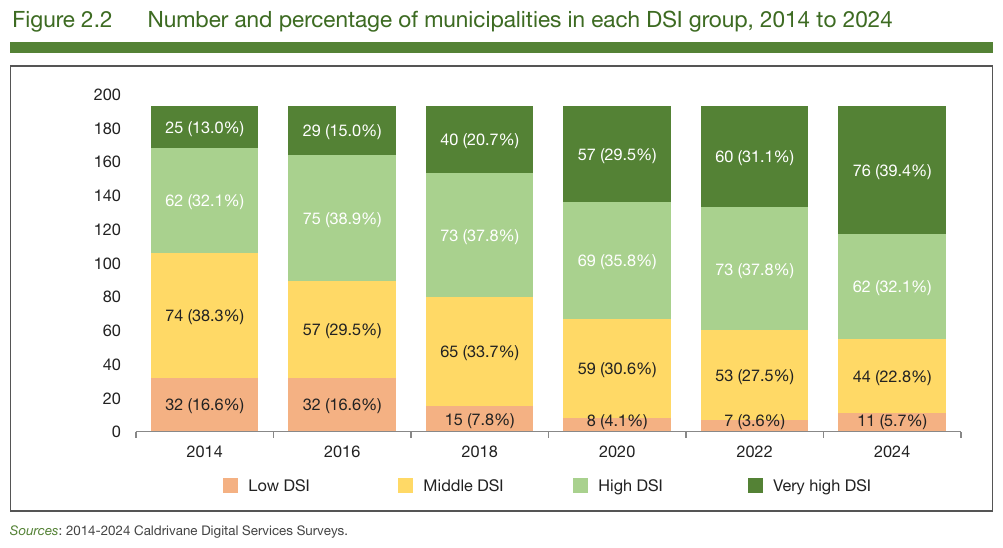
Six stacked bars over six labeled yearsdigital-services-survey-2024_p62
Six stacked bars over six labeled years, four legend series, every segment printing its value: full coverage is 6 × 4 = 24 values, all printed, so all copied as printed — count and share together.
Source page
Expected output
| Low DSI | Middle DSI | High DSI | Very high DSI | |
|---|---|---|---|---|
| 2014 | 32 (16.6%) | 74 (38.3%) | 62 (32.1%) | 25 (13.0%) |
| 2016 | 32 (16.6%) | 57 (29.5%) | 75 (38.9%) | 29 (15.0%) |
| 2018 | 15 (7.8%) | 65 (33.7%) | 73 (37.8%) | 40 (20.7%) |
| 2020 | 8 (4.1%) | 59 (30.6%) | 69 (35.8%) | 57 (29.5%) |
| 2022 | 7 (3.6%) | 53 (27.5%) | 73 (37.8%) | 60 (31.1%) |
| 2024 | 11 (5.7%) | 44 (22.8%) | 62 (32.1%) | 76 (39.4%) |
Sources: 2014-2024 Caldrivane Digital Services Surveys.
Neighbouring rules, and how they differ
More
Rule id charts-cover-every-data-point · charts basics