Quick Reference
What does every rule require, in one list?
In detail
Every rule's requirement, taken from its status callout, in section order. This page is generated; the rules themselves are the authority.
Reading the examples. Each one pairs a source page with the output the rule expects. ✅ Sample: the rule applies. ❌ Counter-sample: it looks like it applies and does not, or a rendering got it wrong. A non-conforming output, in red, is shown only for contrast. … marks content left out of an excerpt.
The point, in a small example
Four everyday cases: text in an image, a pictured table, a flow diagram and a form. Each is the direct application of one requirement in the list below. These pages are made up to isolate the rule.
Text inside an image is still text
Transcribe all visible text, including the printed typo “Wednsday”. Do not substitute an image link, a summary or a corrected spelling. The top line is a notice label, not a document section.
Source page

Non-conforming output
What the rule rules out.
Expected output
Delivery notice

Arrives Wednsday at 09:30.

Gate B — keep this slip.A pictured table stays a table
The image contains a two-column table. Preserve both rows and the printed headers; a prose summary loses the cell relationships.
Source page
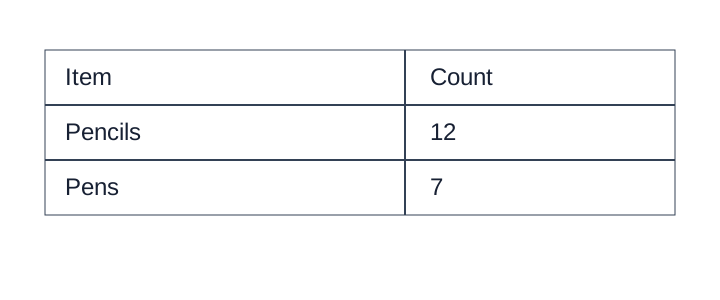
Non-conforming output
What the rule rules out.
A table listing stationery supplies.Expected output
<table>
<tr><th>Item</th><th>Count</th></tr>
<tr><td>Pencils</td><td>12</td></tr>
<tr><td>Pens</td><td>7</td></tr>
</table>A flow image becomes a diagram
Keep all three printed labels and both directed connections. This simple flow fits Mermaid; other faithful supported diagram languages are valid.
Source page
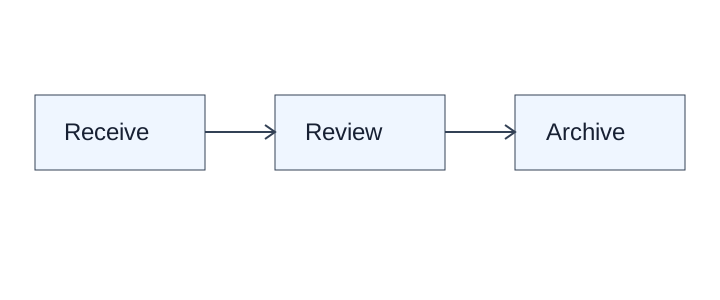
Non-conforming output
What the rule rules out.
[A three-step process diagram]Expected output
```diagram/mermaid
flowchart LR
  A[Receive] --> B[Review]
  B --> C[Archive]
```Keep values verbatim and blank fields explicit
These are labeled fill-in fields, not a table. Keep leading zeros and the ambiguous date exactly as printed; do not infer a currency or expand the date. The third answer line is empty.
Source page
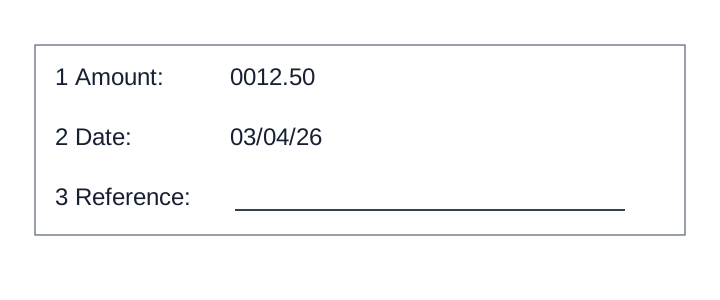
Non-conforming output
What the rule rules out.
- **Amount:** $12.50
- **Date:** March 4, 2026
Expected output
- \[1\] **Amount:** 0012.50
- \[2\] **Date:** 03/04/26
- \[3\] **Reference:** [blank]§1 Conventions
| 1.2 | ✅ | Conformance A conforming output is a Markdown rendering of a document that satisfies every MUST of this protocol, optionally accompanied by a sidecar that satisfies The Sidecar. A producer conforms when every output it emits conforms. |
§2 Principles
| 2.1 | ✅ | The Page Is the Ground Truth The output MUST represent the document as rendered: what a careful reader extracts from the pages, semantic structure over visual appearance, with text transcribed verbatim — typos included. |
| 2.2 | ✅ | Never Drop, Never Invent Every piece of printed content MUST survive into the output (never drop), and the output MUST NOT contain a label, value, span, header, structure or relationship that the page does not print (never invent). |
| 2.3 | ✅ | Traceability Every element of the output MUST be attributable to the place on the page it was read from. When boxes are requested, every Markdown element MUST have a box, and every box MUST cover exactly the printed content of its element. |
§3 Output model
| 3.1 | ✅ | Elements A document is represented as a sequence of pages, each a sequence of elements in reading order. Every element MUST have exactly one class from the table below and MUST be rendered in Markdown as that class prescribes. |
| 3.2 | ✅ | Markdown Rendering The output MUST be one Markdown document for the whole document, with pages in order separated by a line holding only |
| 3.3 | ✅ | Boxes and Granularity A box is the region of the page that an element's printed content occupies. Boxes MUST be given at exactly the granularity that was requested, and at that granularity every element MUST have one box. A producer MUST NOT return several granularities in place of one. |
| 3.4 | ✅ | The Sidecar When boxes are requested, the output MUST include a sidecar: a structured file that lists, page by page, every element with its class, its Markdown and its box. The sidecar is the source the Markdown is rendered from; the Markdown MUST be exactly the concatenation of the sidecar's element Markdown in reading order, each element preceded by its inline box anchor, with pages joined as Markdown Rendering requires. |
| 3.5 | ❓ | Output Options Four situations have more than one conforming output, depending on what the producer was asked to produce. Working default: the narrower reading — fragments separate, graphics described, everything printed recorded — which conforms under either setting. Proposed resolution: make each an explicit, named option of the request, and judge the output under the options it was produced with. |
§4 Document level
| 4.2 | ✅ | Choices Made Once Per Document Where the protocol accepts two renderings of a situation, the rendering chosen at the first page that forces the choice MUST be used on every later page of the same document. A document MUST NOT mix the accepted renderings of one situation. |
| 4.3 | ✅ | Cross-Page Tables A table that runs across a page break MUST be rendered as one fragment per page, each on its own page, complete and exactly as that page prints it. Fragments MUST NOT be joined. In the sidecar, each fragment MUST carry two continuation flags — continues from the previous page and continues onto the next page — decided at document level, from the pages on both sides of the break. |
| 4.4 | ✅ | Document Type Whether a document is a slide deck or a paged document, and which sheet is its cover, MUST be decided once from the whole document and applied to every page. Only the cover MAY carry a Title element. |
| 4.5 | ✅ | Heading Depth Across Pages A new page MUST NOT restart the heading hierarchy. A heading MUST be given the depth its place in the document implies, and a top-level heading MUST appear only where the page prints one. |
| 4.6 | ✅ | Recurring Page Furniture Whether a margin band is page furniture MUST be decided once for the document. A band that is page furniture on one page MUST be page furniture — a Page-header or Page-footer, never body text and never a heading — on every page it appears on. |
§5 Layout
| 5.1 | ✅ | Block Annotation Every meaningful visible region of a page MUST be one element with one class, one position in the page's reading order and — when boxes are requested — one box. Printed content covered by no element is dropped content, and makes the output non-conforming. |
| 5.2 | ✅ | Block Boundaries A Picture or Table element MUST contain the complete object and nothing else. Its caption, its title, its source note and nearby prose MUST NOT be absorbed into it; each is an element of its own. |
| 5.3 | ✅ | Block Classes Every element MUST have exactly one of the seventeen classes below. Its layout class MUST match the class of the corresponding Markdown element defined in Elements. A class MUST NOT be chosen merely to complete a page: where the class is genuinely unclear, the output MUST NOT assert a class the page does not support. |
| 5.4 | ✅ | Court Caption Blocks Every printed string of a court caption MUST be transcribed, the left column as one block of lines and then the right column, each printed line on its own line. Blank party and case-number lines MUST be |
| 5.5 | ✅ | Embedded Pages A page reproduced inside another page MUST be rendered as the wrapper's furniture followed by the embedded page in its own reading order. Both page numbers MUST be kept, each with its own region, and titles inside an embedded form screenshot MUST NOT be promoted into the wrapper's outline. |
| 5.6 | ✅ | Ignoring and Rejecting A visible region MAY be left out of the output only on the narrow grounds listed below, and a page MAY be declared unrepresentable only when the problem is the page itself. Content that is merely difficult to read MUST NOT be left out on either ground. |
| 5.7 | ✅ | Layout Regions A region's class MUST be settled before its content is rendered, because the class decides which rule governs the rendering. A region rendered under the wrong class is non-conforming however faithfully its text is transcribed. |
| 5.8 | ✅ | Pleading Line Numbers Printed gutter line numbers MUST NOT appear in the Markdown: the body is rendered as continuous paragraphs, as if the margin were blank. When line numbers are requested, each page MUST carry a |
| 5.9 | ✅ | Reading Order The elements of a page MUST form one reading-order sequence that includes every element of the page exactly once — no element left out, none placed twice. The sequence MUST follow the order in which a reader reads the page, not the elements' geometric position. |
| 5.10 | ✅ | Slide Furniture Every printed navigation tab of a slide MUST be transcribed, in printed order, as furniture, and a highlight that identifies the active section MUST be kept with the highlight convention. Labels printed on a photograph MUST be kept with the photograph's description; purely decorative background art MUST NOT be described. |
| 5.11 | ✅ | Stat Tiles Each stat tile MUST be rendered as one printed label–value pair, in tile reading order, under the panel's heading where the panel prints one. Units and qualifiers MUST stay attached to their value. |
§6 Headings and page structure
| 6.1 | ✅ | Dot Leader Lines Dot leaders MUST NOT appear in the output. The label and the value on either side of a leader MUST be kept exactly as printed; the dots themselves produce nothing. |
| 6.2 | ✅ | Line Breaks Inside a Block One printed block set on several lines MUST stay one element, with a plain newline between its printed lines — no trailing spaces, no |
| 6.3 | ✅ | Line Separators and Breaks A printed section separator MUST be rendered as |
| 6.4 | ✅ | Marginal Notes Each printed marginal note MUST be rendered as a separate block placed immediately after the element it annotates. Where the element it belongs to cannot be established, the note MUST still be kept as a separate block and MUST NOT be merged into body text. |
| 6.5 | ✅ | Numbered Section Headings A numbered line that stands alone as a title with body text beneath it MUST be rendered as a heading, one level deeper per level of numbering. A numbered line that is itself the content — including a bare number printed above its paragraph — MUST be rendered as a list item carrying that content. The printed number MUST be kept exactly as printed, on the same line as its text. |
| 6.6 | ✅ | Printed Page Numbers A printed page number (the folio) MUST be kept in the header or footer band it is printed in, verbatim, and MUST NOT appear as a loose element in the body. When the printed page number is requested, it MUST also be recorded on its own for the page, as printed, and MUST NOT be inferred for a page that prints none. |
| 6.7 | ✅ | Recognising Ambiguous Headings A standalone structural title that organises what follows MUST be rendered as a heading. Run-in labels, repeated item labels, captions and page furniture MUST keep their own roles and MUST NOT be rendered as headings. Font size alone MUST NOT decide whether a line is a heading. |
| 6.8 | ✅ | Run-In Headings A run-in label and the sentence, value or URL that follows it on the same line MUST be rendered as one paragraph, with the label's printed emphasis preserved. The label MUST NOT be rendered as a Markdown heading. |
| 6.9 | ✅ | Stacked Headings The wrapped lines of one title MUST be joined with spaces into one heading. An article number MUST stay with its title. A company name printed above a statement or document title, exhibit labels, units lines and other furniture MUST be kept separate from the title; a title and subtitle MAY be split only where the document establishes distinct roles for them. |
| 6.10 | ✅ | Table of Contents A table of contents, table of authorities or index MUST be rendered as a list: one item per entry, nested as the page indents it, each item the label then its page number(s) exactly as printed, separated by a space. It MUST NOT be rendered as a table. |
| 6.11 | ✅ | Transcript Pages On a transcript page, each speaker turn MUST be rendered as one paragraph that begins with its printed marker ( |
§7 Text
| 7.1 | ✅ | Text Formatting Conventions Inline marks MUST be written with exactly the markup in the table below. Where Markdown has no syntax for a mark, the output MUST use the HTML element named here and MUST NOT use a notation of its own. |
| 7.2.1 | ✅ | Bold and Italics Bold MUST be written |
| 7.2.2 | ✅ | Displayed Equations Displayed mathematics MUST be written as LaTeX inside |
| 7.2.3 | ✅ | Drop Caps A drop cap MUST be joined directly to the rest of its word, with no space, line break or styling added. The output MUST NOT mark the letter as bold, enlarged or otherwise distinct. |
| 7.2.4 | ✅ | Escaping Printed Marks A character the page prints is content, even when Markdown would read it as syntax. It MUST be escaped so that it cannot open a span — |
| 7.2.5 | ✅ | Highlighted Text Highlighted text MUST be wrapped in |
| 7.2.6 | ✅ | Inline Equations Every equation MUST be written as LaTeX inside |
| 7.2.7 | ✅ | Line-End Hyphenation A word broken across a line end MUST be joined, and a hyphen that exists only for the break MUST be removed. A hyphen that belongs to the word MUST be kept. Where the two cannot be told apart, the visible hyphen MUST be kept. |
| 7.2.8 | ✅ | Links Hyperlinks and email addresses MUST be transcribed as raw text. Link syntax — |
| 7.2.9 | ✅ | Quote Blocks A quoted or inset region MUST be flattened: its content is rendered as ordinary text, headings and tables included. The output MUST NOT add |
| 7.2.10 | ✅ | Small Capitals Text set in small capitals MUST be transcribed as uppercase letters. The output MUST NOT add small-caps styling, and MUST NOT substitute the text layer's mixed case for the capitals the page shows. |
| 7.2.11 | ✅ | Superscript and Subscript Raised and lowered text outside maths MUST be written with |
| 7.2.12 | ✅ | Underlined Text Underlined text MUST be wrapped in |
| 7.2.13 | ✅ | Verse and Hard Line Breaks Text whose line breaks carry meaning — verse, song text, deliberately broken lines — MUST be written one printed line per source line, separated by a plain newline, and MUST NOT be reflowed into running prose. No trailing spaces, no |
| 7.3.1 | ✅ | Clipped Text Text cut off at the page edge MUST be rendered as the characters actually visible. A clipped word MUST NOT be completed, and an ellipsis or marker that the page does not print MUST NOT be appended to it. |
| 7.3.2 | ✅ | E-Signature Tags A field that carries only an e-signature tag is unsigned and MUST be rendered as a blank, |
| 7.3.3 | ✅ | Handwritten Annotations A handwritten note on a printed page MUST be rendered as |
| 7.3.4 | ✅ | Iconography and Symbols An icon that carries meaning MUST NOT be dropped. It MUST be rendered as a bracketed semantic tag in the icon's position: one lower-case word naming what the icon means — |
| 7.3.5 | ✅ | Margin Banners Rotated text printed along a side margin MUST be rendered once, as a furniture block of its own outside the body flow, with its words kept — branding included. It MUST NOT be tagged as a watermark unless it actually overlays the content. |
| 7.3.6 | ✅ | Overlapping Text Where two printed strings overlap, each legible string MUST be rendered whole, in a block of its own, with the stamp first. Legible fragments MUST be kept; characters hidden by the overlap MUST NOT be reconstructed. |
| 7.3.7 | ✅ | QR Codes and Bar Codes A QR code or bar code MUST be rendered as an image reference whose alt text holds the decoded content and whose target holds the literal label: |
| 7.3.8 | ✅ | Redacted Text Each contiguous redacted span MUST be rendered as one |
| 7.3.9 | ✅ | Seals and Round Stamps A seal or round stamp MUST be rendered as |
| 7.3.10 | ✅ | Signatures A handwritten signature MUST be rendered as a bracketed placeholder: |
| 7.3.11 | ✅ | Stamps Ink applied over or beside the printed page — overprinted, boxed or rotated, or in a different ink — MUST be rendered as |
| 7.3.12 | ✅ | Text Colors Text colour MUST be carried only when it is the only thing distinguishing some text from the rest, written as |
| 7.3.13 | ✅ | Watermarks A watermark MUST NOT be deleted and MUST NOT be left inside the body text. It MUST be rendered once per page that prints it, as its own element at the top of that page's content: |
§8 Lists
| 8.1 | ✅ | Bullets and Sub-Bullets A top-level bulleted item MUST be rendered with the |
§9 Tables
| 9.1.1 | ✅ | Borderless Whitespace Tables A whitespace-aligned block with columns MUST be rendered as a table. Its column tracks MUST be read off the widest row, every value MUST be placed in the track it sits in, and the block MUST NOT be rendered as preformatted text. |
| 9.1.2 | ✅ | Chart With a Printed Data Grid When a chart prints its data grid beside or beneath the canvas, the output MUST render that grid exactly as printed — same orientation, same headers, same row order — and MUST NOT render any other table for the chart. |
| 9.1.3 | ✅ | Empty Pre-Printed Grids A printed grid with no values entered MUST be rendered as a table, with its headers and every printed empty row as a row of empty cells. It MUST NOT be skipped, and MUST NOT be reduced to its headers alone. |
| 9.1.4 | ✅ | Header-Only Tables The output MUST NOT contain a table that is a header with no body. A header row MUST either be rendered together with its body or, where no body can be joined to it, rendered as ordinary text — never as an orphan header row standing as a table. |
| 9.1.5 | ✅ | Is This Even a Table A region MUST be rendered as a table when, and only when, its rows and columns encode a relation — when the position of a value in the grid is what gives the value its meaning. A region that encodes no relation MUST NOT be rendered as a table. |
| 9.2.1 | ✅ | Bands Inside the Grid A full-width band inside a grid — a date line, a section line, a change of shading — MUST NOT end the table. The rows above and below it MUST stay in one table, and the band MUST be rendered as one row whose single cell spans every column. |
| 9.2.2 | ✅ | Column Continuation One long series printed as side-by-side blocks SHOULD be rendered as one table per printed block, each carrying its own copy of the headers, including repeated blocks inside one frame. A checker MUST accept source-supported joined equivalents without losing or reassigning records. |
| 9.2.3 | ✅ | Continued in the Title A continuation marker — |
| 9.2.4 | ✅ | Duplicated Tables Every printed occurrence of a table MUST be rendered, in reading order, each as its own table — including a table the page prints twice. Transcription is not summarisation: page content MUST NOT be deduplicated. |
| 9.2.5 | ✅ | Group and Cohort Bands Bands over stacked grids resolve on one question: is there a shared row spine? Grids sharing one spine MUST be rendered as one table. Grids with no shared spine and no column headers MUST be rendered as one table per band, with the band as that table's header row. |
| 9.2.6 | ✅ | Horizontal Slicing A table too wide for the page, printed as stacked column blocks, MUST be rendered as one table per printed block, each keeping its repeated row-label column. The blocks MUST NOT be re-widened into a single wide table. |
| 9.2.7 | ✅ | Repeated Headers and Title Bands Within one page, a column-header row printed again after data rows MUST close the table and open a new one at the repeat. Header repetition is the table-boundary signal. |
| 9.2.8 | ✅ | Side-by-Side Mini Tables Boxes sitting side by side with their own titles and their own schemas MUST be rendered as separate tables — even when their rows line up perfectly. Neighbouring tables MUST NOT be woven together, and a small side table MUST NOT be folded into the middle of another table's body. |
| 9.2.9 | ✅ | Split Tables Sharing a Header Fragments that share a header row or a label column printed only once MUST be rendered as one table. The missing header is the proof that the second fragment was never meant to stand alone. |
| 9.3.1 | ✅ | Barely-Existing Columns and Headers The output MUST transcribe what is printed and add nothing. A column or a header MUST NOT be dropped because it is empty, plainly styled or easy to miss, and a label MUST NOT be invented for a cell that has none. |
| 9.3.2 | ✅ | Header Wrap vs Real Tier A header line with a rule beneath it, standing over two or more self-standing leaf labels, is a real tier and MUST be rendered as its own header row. Fragments that simply stack with no border and read as one phrase are a wrapped label and MUST be joined with a space into a single header cell. |
| 9.3.3 | ✅ | Multi-Row Header Tiers Every printed header tier MUST be rendered as its own header row, with exact colspans. A group header MUST span only its data columns; the row-label stub takes a |
| 9.3.4 | ✅ | SEC Period Tiers A financial period stack MUST be rendered as its printed tiers: period groups over their own date leaves, an apex qualifier above them, a stacked month and year joined into one leaf label, and the units note kept verbatim as the corner header cell. |
| 9.3.5 | ⚖️ | Units Row A units line under the header MAY be rendered as a second header row, or folded into the header label above it ("Premium ($000)"). Both forms conform, and a document MUST use one of them throughout (see Choices Made Once Per Document). A units line MUST NOT become the first body row. |
| 9.4.1 | ✅ | Gutter Columns A currency glyph or a separator typeset in a column track of its own SHOULD be rendered in the same cell as the value it belongs to — |
| 9.4.2 | ✅ | Header Body Column Count Mismatch Every row of a table MUST carry the full column count. Where the header and the body disagree, the short side MUST be padded with empty cells, one per missing position, and MUST NOT be padded with a duplicated or invented value. |
| 9.5.1 | ⚖️ | Blank and Spacer Rows A genuinely printed blank row inside a table MAY be rendered as an empty row or left out; both forms conform, and a document MUST use one of them throughout. A blank row that is the only thing separating two groups of rows SHOULD be rendered as an empty row. |
| 9.5.2 | ✅ | Nested Tables A small grid printed inside one cell of a table MUST be rendered by subdividing that cell into the outer table's own grid: the inner grid's cells become rows and columns of the outer table, and the neighbouring cells span them. The output MUST NOT contain a nested |
| 9.5.3 | ✅ | Record Groups and Multi-Line Cells Independently printed records MUST each be rendered as their own row, with |
| 9.5.4 | ✅ | Repeated Identical Values A |
| 9.5.5 | ✅ | Row-Label Hierarchy Where a table's row labels are indented to show nesting, every label cell MUST carry its absolute level as a |
| 9.5.6 | ✅ | Total and Subtotal Rows In a total or subtotal row, the label cell MUST be a |
| 9.6.1 | ✅ | Accounting Number Formats Every number in a cell MUST be transcribed exactly as printed — parentheses, currency dashes, separators and change markers included. The output MUST NOT carry a normalised twin of the value beside it, and MUST NOT replace the printed form with a normalised one. |
| 9.6.2 | ✅ | Bold and Italic Inside Tables Inside a table, bold, italic and underline MUST be marked per cell, and only where the printed glyphs of that cell are heavier, slanted or underlined. A whole column or a whole header row MUST NOT be styled on principle. Inside an HTML table cell, bold MUST be written |
| 9.6.3 | ✅ | Cell Text Fidelity The text of a cell MUST be what the rendered page shows — not the text layer, not OCR, and not what the value ought to be. A character that cannot be read at any zoom MUST be written as |
| 9.6.4 | ✅ | Color as the Value A cell whose only content is a coloured fill MUST be rendered as an empty |
| 9.6.5 | ✅ | Handwriting and Stamps Handwriting over a printed value MUST keep both, the struck-through printed value first: |
| 9.6.6 | ✅ | Marks and Symbols in Cells A footnote marker MUST stay in the cell of the value it is attached to. An em-dash alone in a cell is a value and MUST be kept; a cell printed blank MUST stay blank. A cell whose content is a symbol or icon MUST be rendered as a bracketed transcription of what the mark asserts, and MUST NOT be replaced by an emoji. |
| 9.6.7 | ✅ | Struck and Replaced Values A cell holding a struck value and its replacement MUST render both, struck first — |
| 9.7.1 | ✅ | Bottom Edge Totals and Islands Content printed below or beside a table MUST NOT be dropped, even when it sits outside the ruled frame. Where it continues the table's ruled grid it MUST be rendered as rows of that table; where it stands apart as its own unbordered block it MUST be rendered as its own small key-value table. |
| 9.7.2 | ✅ | Footnotes Inside the Frame A table footnote MUST be rendered outside the table, as footnote text placed after it — even when the page prints it inside the table's ruled border. It MUST NOT be rendered as a row of the table. It retains the Footnote class and MUST NOT be wrapped in |
| 9.7.3 | ✅ | Titles Banners Captions For a table-only title, the frame and the fill decide. A band that shares the table's border or fill MUST be rendered as a header row inside the table; a table-only title outside the ruled frame MUST be rendered as |
| 9.8.1 | ✅ | Rotated and Diagonal Content A rotated table MUST be read in its own orientation, never in page orientation. A diagonally split corner cell MUST stay one cell holding both labels separated by a slash — |
| 9.8.2 | ✅ | Triangles and Matrix Tables Every row MUST carry the full column count. The jagged half MUST be padded with individual empty cells — one |
§10 Forms
| 10.1 | ✅ | Forms and Key-Value Regions Fill-in fields and checkbox regions are key-value content, not tables: they MUST be rendered as the key-value list of The Key-Value List and MUST NOT be rendered as a table. The output MUST NOT contain a two-column key/value table that the page does not print as a ruled grid. |
| 10.2 | ✅ | Repeated and Unlabelled Fields Field groups that repeat without a printed heading MUST be kept as anonymous groups in printed order, separated by a blank line in the Markdown. The output MUST NOT invent a heading, label or positional id — no |
| 10.3.1 | ✅ | Ids and Labels A field's id is its printed designator, written exactly as printed in escaped brackets outside the bold label. Its label is the printed caption, verbatim. A label MUST NOT repeat the id, and a caption MUST NOT be written as an id. |
| 10.3.2 | ✅ | The Key-Value List Fillable form content MUST be rendered as a Markdown key-value list, not as a table. Every field MUST be one list item using the |
| 10.3.3 | ✅ | Values Are Verbatim Entered content MUST be transcribed exactly as it appears on the page. A value MUST NOT be rounded, reformatted, computed or summarised. |
| 10.4.1 | ✅ | Blanks Inside Sentences A sentence with fill-in gaps MUST be kept intact, with each gap rendered as |
| 10.4.2 | ✅ | Checkboxes A checked box MUST be rendered as |
| 10.4.3 | ✅ | Checklists Each checklist item MUST be rendered box-first — the box before its printed label — and items MUST be nested under their group label. A group-level box MUST stay on its group's line. A form's group labels MUST NOT be promoted to document headings. |
| 10.4.4 | ✅ | Fill-Ins Each printed entry field MUST be rendered as one line. An empty field MUST be rendered as |
| 10.4.5 | ✅ | Option Groups A question answered by ticking one or more of several printed boxes MUST be rendered as one group: the caption line, then one nested box-first line per option. Every printed option MUST be listed, ticked or not. |
| 10.4.6 | ✅ | Printed Buttons and Placeholders The text of a printed button, and the caption of a box reserved for a later stamp or seal, MUST be transcribed as text where it sits, in reading order. A reserved box is not a fill-in and MUST NOT be rendered with |
| 10.5.1 | ✅ | Fields Outside the Form A field printed in a header, a footer or anywhere outside the main form body MUST still be rendered. A field printed above the form MUST be placed before the form content; any other such field MUST be placed after it. |
| 10.5.2 | ✅ | Form Reading Order The fields of a form MUST be ordered by the form's printed indexing scheme — its ids — rather than by column-first or row-first geometry. |
| 10.5.3 | ✅ | Sections and Grouped Fields A printed heading that names a group of fields opens a section. Only a printed grouping MAY get a parent: fields MUST NOT be wrapped in a section or group the form does not print. |
| 10.5.4 | ✅ | Tables Inside Forms Inside a form, a table MUST be used only for a genuine grid: one shared set of printed column headers over repeating rows of the same shape, or a printed row-by-column matrix. Where it is ambiguous, the fields SHOULD be rendered as individual field lines. |
§11 Charts
| 11.1.1 | ✅ | Cover Every Data Point A chart MUST be rendered as a chart table that holds every data point the chart draws: every category position × every series, plus every printed callout that belongs to a position. A data point MUST NOT be skipped because it is hard to read; it MAY be left out only when no printed text can locate it or it is genuinely unreadable. |
| 11.1.2 | ✅ | Labels The category labels and series names of a chart table MUST be text printed on the chart — an axis tick, a legend entry, a direct label — copied verbatim. A label MUST NOT carry unit text imported from elsewhere on the page, colour words, chart-type words or an expanded abbreviation, and two dimensions MUST NOT be merged into one label. |
| 11.1.3 | ✅ | Multiple Charts and Reference Ink Each chart or panel on a page MUST get its own chart table, and every panel MUST be covered (see Cover Every Data Point). Reference ink — labeled averages, trend lines, shaded bands, event callouts — draws no data points and MUST NOT be rendered as data: it gets no row, no column and no value in any chart table. Its printed text MUST still be kept. |
| 11.1.4 | ✅ | Values and Tolerances Each cell of a chart table holds one of three values. A value printed on the chart MUST be copied character for character and in full. A value not printed MUST be estimated at the mark's visual centre against the mark's own axis. A mark drawn at the baseline, or a labeled position with no mark, MUST be |
| 11.2.1 | ✅ | Bars and Histograms A bar chart MUST be rendered as a chart table with one value per bar: one row per category, one column per series. A histogram is a bar chart whose category is the bin: a bin the axis does not label MUST still get its row, labeled by its axis value, and a labeled position with no bar MUST hold |
| 11.2.2 | ✅ | Dual-Axis and Combo Charts Bars and lines on one canvas, or a second value axis, change only how values are read: each series' values MUST be copied or estimated against its own axis. The chart table is laid out as usual — one row per x position, one column per series — and a series name MUST NOT gain its mark type or axis side (no |
| 11.2.3 | ✅ | Gantt and Sankey Charts A gantt chart MUST be rendered with one row per mark, giving the mark's label, its start and its end on the time axis — for a milestone, start and end are the same period. A sankey diagram MUST be rendered with one row per flow, giving its source node, its target node and the value it carries. Each family uses its one shape throughout, whatever the chart prints. |
| 11.2.4 | ✅ | Legend and Overlay Values When a chart's values are printed only in its legend or as data labels over its marks, those printed numbers are the data: every one of them MUST be in the chart table, copied exactly. A companion series without printed values is estimated as usual — unless no printed label can locate its points, in which case it has no column (see Labels). |
| 11.2.5 | ✅ | Line Charts A line chart MUST be rendered with one value per series per x position: one row per x position, one column per series, each series named by its legend entry or by its direct label at the line's end. A value printed at a point MUST be copied; every other value is read against the axis. Wiggles between x positions are not positions. |
| 11.2.6 | ✅ | Log Scale Charts A logarithmic axis changes the reading, not the chart table. Unprinted values MUST be estimated against the printed decade bands, by the mark's position inside its band, and SHOULD be given to no more than two significant figures. |
| 11.2.7 | ✅ | Maps and Treemaps A treemap MUST be rendered with one row per tile: the tile's label and its printed value. Tile area MUST NOT be turned into a value: no axis calibrates it. A map with printed values per region MUST be rendered with one row per printed region–value pair. A shading-only map with a discrete legend MUST give each region whose fill matches one swatch unambiguously that legend class, copied verbatim. |
| 11.2.8 | ✅ | Scatter and Error Bars A named scatter point MUST be rendered as one row holding its x value and its y value. Marker series over categories are ordinary series columns. An error bar's centre is an ordinary value, and its whisker span MUST be given with it: the low and high ends read at the whisker caps. A box plot MUST give its median, first and third quartiles, and its whisker ends when they are drawn. Points with no printed name have nothing to locate them and are not rendered as rows. |
| 11.2.9 | ✅ | Stacked Bars and Waterfalls A stacked segment's value MUST be the segment's own span — the size it draws between its two boundaries — never the cumulative height at its top edge. A waterfall step follows the same rule on a floating segment: its value is the rise or fall the step itself draws. Each segment series is a column; a printed total is a value of its own. |
§12 Images and diagrams
| 12.1.1 | ✅ | Images The content of an image MUST be put into the text stream as whatever the image actually is — transcribed text, a table or a diagram. The output MUST NOT contain a file reference or a bracketed placeholder in place of an image. |
| 12.1.2 | ✅ | Images and Figures The output MUST NOT contain an image reference |
| 12.1.3 | ✅ | Logos A logo MUST be rendered as a marker carrying its printed words, |
| 12.2.1 | ✅ | Blueprints A floor plan or architectural drawing MUST use a faithful |
| 12.2.2 | ✅ | Diagrams and Flowcharts A diagram or blueprint MUST use a fenced |
| 12.2.3 | ✅ | Electrical Schematics A component-level circuit schematic MUST use a faithful |
| 12.2.4 | ✅ | Geographic Maps How a map is rendered depends on what it is for. A data map whose values sit in drawn regions MUST be rendered as a |
| 12.2.5 | ✅ | Slide Diagrams A labelled figure MUST use a suitable |
§13 Other
| 13.1 | ✅ | Chemical Molecules Linear formulae, ions and reactions MUST be written with |
| 13.2 | ✅ | Music Notation Every string printed on a music page MUST be transcribed as ordinary text. The staves themselves MUST be described, not encoded: each staff region is a fenced |