Document
Parsing
Protocol (DPP)
A protocol for how to make truthful and AI‑friendly interpretation of documents
The protocol, rule by rule
Each convention answers one parsing question: what to preserve, and how to represent it. Numbered and ordered as in the RFC. Open one to see its requirement, each part of the rule with real pages beside their expected output, and how it differs from its neighbours.
doc decided once for the whole document2 forms two renderings conformopen not yet settledRFC ↗ kept in the RFC only
§1Conventions
§2Principles
§3Output model
§4Document level
§5Layout
§6Headings and page structure
§7Text
- 7.1Text Formatting Conventions
- 7.2.1Bold and Italics
- 7.2.2Displayed Equations
- 7.2.3Drop Caps
- 7.2.4Escaping Printed Marks
- 7.2.5Highlighted Text
- 7.2.6Inline Equations
- 7.2.7Line-End Hyphenation
- 7.2.8Links
- 7.2.9Quote Blocks
- 7.2.10Small Capitals
- 7.2.11Superscript and Subscript
- 7.2.12Underlined Text
- 7.2.13Verse and Hard Line Breaks
- 7.3.1Clipped Text
- 7.3.2E-Signature Tags
- 7.3.3Handwritten Annotations
- 7.3.4Iconography and Symbols
- 7.3.5Margin Banners
- 7.3.6Overlapping Text
- 7.3.7QR Codes and Bar Codes
- 7.3.8Redacted Text
- 7.3.9Seals and Round Stamps
- 7.3.10Signatures
- 7.3.11Stamps
- 7.3.12Text Colors
- 7.3.13Watermarks
§8Lists
§9Tables
- 9.1.1Borderless Whitespace Tables
- 9.1.2Chart With a Printed Data Grid
- 9.1.3Empty Pre-Printed Grids
- 9.1.4Header-Only Tables
- 9.1.5Is This Even a Table
- 9.2.1Bands Inside the Grid
- 9.2.2Column Continuation
- 9.2.3Continued in the Title
- 9.2.4Duplicated Tables
- 9.2.5Group and Cohort Bands
- 9.2.6Horizontal Slicing
- 9.2.7Repeated Headers and Title Bands
- 9.2.8Side-by-Side Mini Tables
- 9.2.9Split Tables Sharing a Header
- 9.3.1Barely-Existing Columns and Headers
- 9.3.2Header Wrap vs Real Tier
- 9.3.3Multi-Row Header Tiers
- 9.3.4SEC Period Tiers
- 9.3.5Units Row2 forms
- 9.4.1Gutter Columns
- 9.4.2Header Body Column Count Mismatch
- 9.5.1Blank and Spacer Rows2 forms
- 9.5.2Nested Tables
- 9.5.3Record Groups and Multi-Line Cells
- 9.5.4Repeated Identical Values
- 9.5.5Row-Label Hierarchy
- 9.5.6Total and Subtotal Rows
- 9.6.1Accounting Number Formats
- 9.6.2Bold and Italic Inside Tables
- 9.6.3Cell Text Fidelity
- 9.6.4Color as the Value
- 9.6.5Handwriting and Stamps
- 9.6.6Marks and Symbols in Cells
- 9.6.7Struck and Replaced Values
- 9.7.1Bottom Edge Totals and Islands
- 9.7.2Footnotes Inside the Frame
- 9.7.3Titles Banners Captions
- 9.8.1Rotated and Diagonal Content
- 9.8.2Triangles and Matrix Tables
§10Forms
- 10.1Forms and Key-Value Regions
- 10.2Repeated and Unlabelled Fields
- 10.3.1Ids and Labels
- 10.3.2The Key-Value List
- 10.3.3Values Are Verbatim
- 10.4.1Blanks Inside Sentences
- 10.4.2Checkboxes
- 10.4.3Checklists
- 10.4.4Fill-Ins
- 10.4.5Option Groups
- 10.4.6Printed Buttons and Placeholders
- 10.5.1Fields Outside the Form
- 10.5.2Form Reading Order
- 10.5.3Sections and Grouped Fields
- 10.5.4Tables Inside Forms
§11Charts
- 11.1.1Cover Every Data Point
- 11.1.2Labels
- 11.1.3Multiple Charts and Reference Ink
- 11.1.4Values and Tolerances
- 11.2.1Bars and Histograms
- 11.2.2Dual-Axis and Combo Charts
- 11.2.3Gantt and Sankey Charts
- 11.2.4Legend and Overlay Values
- 11.2.5Line Charts
- 11.2.6Log Scale Charts
- 11.2.7Maps and Treemaps
- 11.2.8Scatter and Error Bars
- 11.2.9Stacked Bars and Waterfalls
§12Images and diagrams
§13Other
AEquivalent forms
CProducing ground truth
- C.1Producing Ground TruthRFC ↗
- C.2About the ExamplesRFC ↗
- C.3Ground Truth — ChartsRFC ↗
- C.4Ground Truth — Headings and Page StructureRFC ↗
- C.5Ground Truth — Images, Diagrams and OtherRFC ↗
- C.6Ground Truth — Inline FormattingRFC ↗
- C.7Ground Truth — LayoutRFC ↗
- C.8Ground Truth — Lists and FormsRFC ↗
- C.9Ground Truth — Marks on the PageRFC ↗
- C.10Ground Truth — Tables 1-3RFC ↗
- C.11Ground Truth — Tables 4-8RFC ↗
- C.12The annotation QA checklistRFC ↗
- C.13The Ground-Truth FileRFC ↗
DQuick reference
Try it on one page.
Give your assistant the conventions, attach a page, and inspect the result. Start with a reusable skill in Claude or a reference file in ChatGPT.
Add the DPP skill to Claude.
- 01
Download the skill.
The ZIP includes the current generator skill, text-only protocol reference, and checker guidance.
Download skill .zip - 02
Upload and enable it.
In Claude, open Customize → Skills, choose + → Create skill → Upload a skill, upload the ZIP, and enable it.
Claude’s setup guide ↗Skills require code execution. Workspace settings may control access.
- 03
Attach a page and use the prompt.
Start with a page image so the assistant can inspect the layout. Compare the result with the source, especially headers, repeated values, and small marks.
Download the Apple sample page ↓
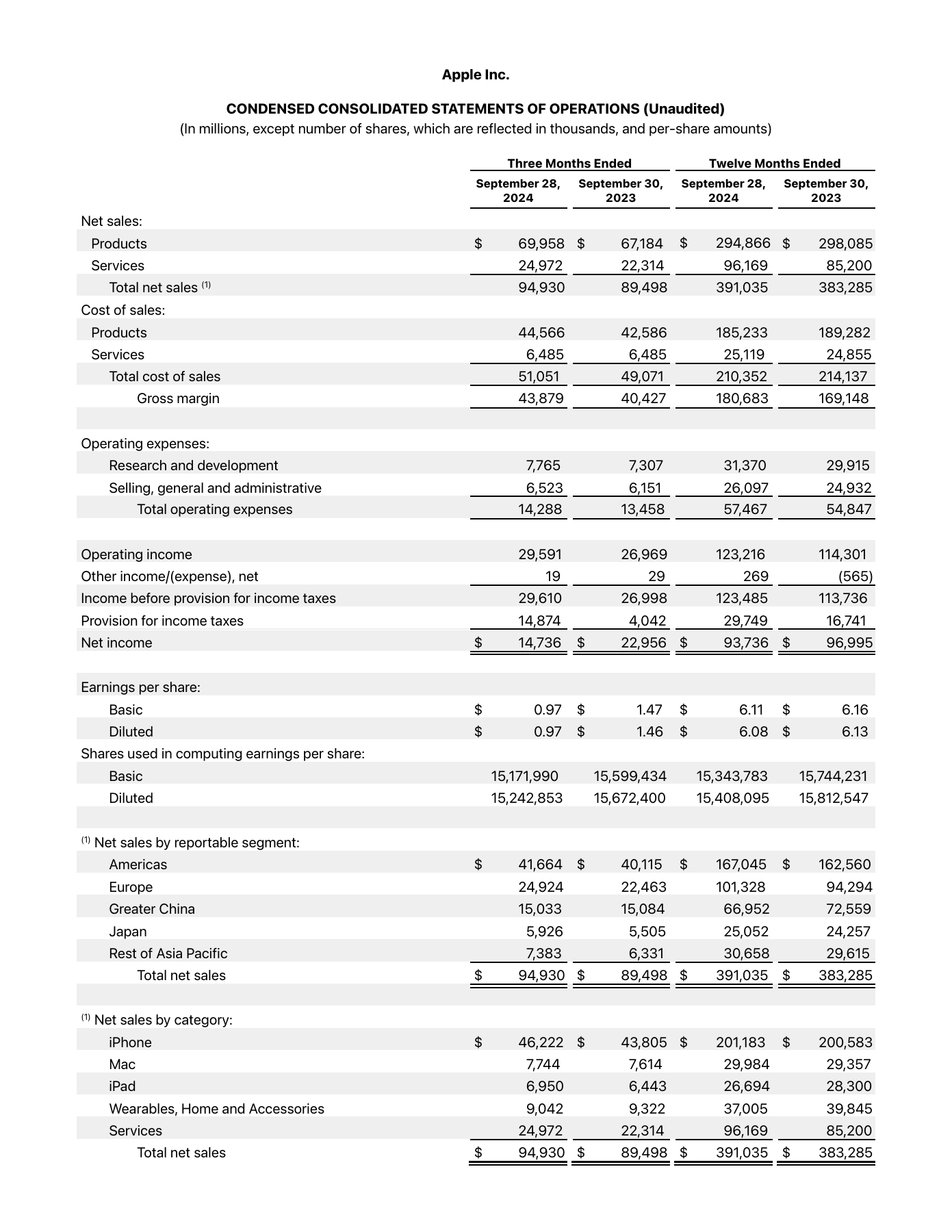
Attach the page image before sending.
A transcription of the page and structured tables that follow the current protocol. Request a separate conformance review when needed. For the Apple sample, check that both 6,485 cells survive and (565) stays as printed.
Compare with the annotated page ↗Scope & sources +
These downloads are generated from the same source revision as the guide. They include the text-only protocol and generator/checker guidance and work without the source repository. The checker is a review skill, not an automated conformance tool. Platform setup instructions checked September 17, 2026.
Draft status & provenance +
DPP is a proposed protocol developed from ParseBench’s document representation conventions. This working draft contains 145 notes. Settled means settled within this draft, rather than independently ratified.
The current materials define representation conventions and examples. The guide defines Markdown, optional sidecar fields, and conformance requirements. The generated checker is guidance for reviewing outputs, not an automated conformance suite. Source digest: b63884001dbc.
The opening figure reproduces page 1 of IRS Form 1040 (2020), a public-domain U.S. government document, with blank margins trimmed. Its annotations are DPP explanations. Convention pages pair source images from the guide with the expected output the guide specifies for them, and with worked encodings. Counter-examples also show the non-conforming output the convention rules out. The worked page reproduces Apple’s published FY2024 statement of operations with explanatory DPP overlays and authored encoding excerpts. The look-alike comparisons are synthetic.
DPP is an open project. The code is MIT-licensed and the protocol and its examples are CC BY 4.0. Propose rules, report examples and send pull requests on GitHub.