Text Formatting Conventions
Which exact markup does each inline mark use?
✅ NormativeSettled. The requirement holds as written.📄 Page ruleCan be applied from the page alone.Read §7.1 in the RFC ↗
Inline marks MUST be written with exactly the markup in the table below. Where Markdown has no syntax for a mark, the output MUST use the HTML element named here and MUST NOT use a notation of its own.
When it applies
This is the inline-markup table for the whole protocol. Each row states its requirement; the linked rule holds the detail, the sub-cases and the examples.
| Printed mark | Requirement | Rule |
|---|---|---|
| Maths, inline or displayed | MUST be LaTeX inside $$ … $$; single $ delimiters MUST NOT be used |
Inline Equations (§7.2.6), Displayed Equations (§7.2.2) |
| Hyperlink or email address | MUST be raw text by default; link syntax MAY be used only when link extraction was requested | Links (§7.2.8) |
| Bold / italic | MUST be Markdown **bold** / *italic*, and only where the glyphs are heavier or slanted |
Bold and Italics (§7.2.1) |
| Underline | MUST be <u>…</u> |
Underlined Text (§7.2.12) |
| Strikeout | MUST be ~~…~~ over exactly the struck glyphs |
Struck and Replaced Values (§9.6.7) |
| Superscript / subscript | MUST be <sup>…</sup> / <sub>…</sub>, never a Unicode raised or lowered glyph |
Superscript and Subscript (§7.2.11) |
| Highlight | MUST be <mark>…</mark> over exactly the highlighted run |
Highlighted Text (§7.2.5) |
| Highlight colour | MUST be carried as style="background-color: HTML_COLOR_NAME" on the <mark>, using the nearest HTML colour name |
Highlighted Text (§7.2.5), Text Colors (§7.3.12) |
| Text colour, when it is the only distinguisher | MUST be <font color="HTML_COLOR_NAME">…</font> |
Text Colors (§7.3.12) |
| Signature | MUST be [signature:{name}], or bare [signature] when the name is not legible |
Signatures (§7.3.10) |
| Logo | MUST be [logo: printed words], or bare [logo] when it prints no text |
Logos (§12.1.3) |
| Watermark | MUST be [watermark: printed words], first in its page's content |
Watermarks (§7.3.13) |
| Stamp | MUST be [stamp: printed words], or bare [stamp] when illegible |
Stamps (§7.3.11) |
| A printed character that is also Markdown syntax | MUST be escaped — \*\*, \_, \|, \` — and MUST NOT be dropped to avoid the collision |
Escaping Printed Marks (§7.2.4) |
Reading the examples. Each one pairs a source page with the output the rule expects. ✅ Sample: the rule applies. ❌ Counter-sample: it looks like it applies and does not, or a rendering got it wrong. A non-conforming output, in red, is shown only for contrast. … marks content left out of an excerpt.
The point, in a small example
Compare visible glyph styles, background highlighting, raised/lowered text and mathematical notation. Each has its own encoding. These pages are made up to isolate the rule.
Preserve bold and italic without inventing emphasis
Only “Urgent” is bold and only “review” is italic. The rest stays plain.
Source page

Non-conforming output
What the rule rules out.
**Urgent review required.**Expected output
**Urgent** *review* required.A yellow highlight has its own markup
Preserve the yellow background as a highlight; it does not imply bold or meaningful yellow text.
Source page

Non-conforming output
What the rule rules out.
Bring **photo ID** tomorrow.Expected output
Bring <mark style="background-color: yellow">photo ID</mark> tomorrow.Underline is not italic
The entire printed sentence is underlined. Use the underline tag, not Markdown underscores.
Source page

Non-conforming output
What the rule rules out.
_Return by Friday._Expected output
<u>Return by Friday.</u>Raised references and lowered chemical indices
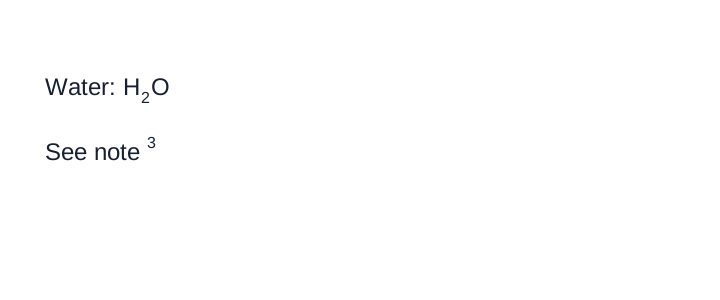
These are non-mathematical raised and lowered characters. Keep them as tags, not Unicode substitutions.
Source page
Non-conforming output
What the rule rules out.
Water: H₂O

See note³
Expected output
Water: H<sub>2</sub>O

See note<sup>3</sup>An equation inside a sentence
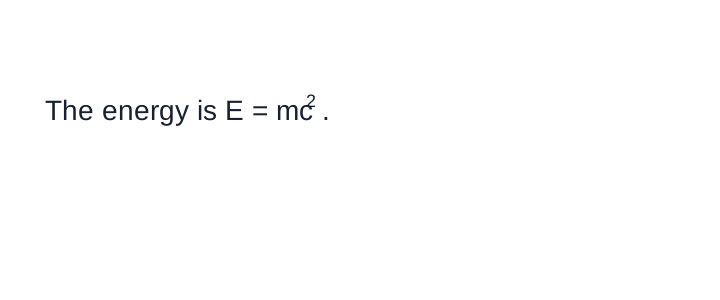
This is mathematical notation, so encode the equation as LaTeX with double-dollar delimiters, even inside a sentence.
Source page
Non-conforming output
What the rule rules out.
The energy is $E = mc^2$.Expected output
The energy is $$E = mc^{2}$$.Why HTML elements at all
Markdown has no syntax for underline, superscript, subscript or highlight. The HTML element passes
through every downstream Markdown renderer unchanged, and it survives a round-trip: a reader can
strip it, render it or read the base characters underneath. A Unicode substitute (², ₂) does
not, which is why Superscript and Subscript (§7.2.11) forbids it.
Neighbouring rules, and how they differ
More
Rule id text-text-formatting-conventions · text formatting inline